

 Deutsch - DE
  Español - ES
  Français - FR
  Português - PT
 How to Migrate from Upfluence to Tapfiliate (Without Losing Your Affiliates)


In this article
Why Marketers Are Leaving Upfluence in 2026
Upfluence vs. Tapfiliate: What Actually Changes
Before You Migrate: What to Export from Upfluence
Step 1: Set Up Your Tapfiliate Account
Step 2: Connect Your Store or Payment System
Step 3: Import Your Affiliates into Tapfiliate
Step 4: Recreate Your Commission Structure
Step 5: Communicate the Switch to Your Affiliates
Your First 30 Days on Tapfiliate
FAQs about Migrating from Upfluence to Tapfiliate
Migration from Upfluence to Tapfiliate: The Short Version
TL;DR
Switching from Upfluence to Tapfiliate takes most teams 2 to 5 business days.
- Upfluence is built for influencer discovery. Tapfiliate is built for affiliate program management. They solve different problems. That gap is exactly why people switch.
- Export your affiliate list, commission history, and creative assets before you touch anything else.
- Shopify, Stripe, and Zapier integrations on Tapfiliate take under 15 minutes to connect.
- You can import affiliates via CSV and rebuild commission structures without starting from scratch.
- Most programs are fully live on Tapfiliate within 30 days.
Why Marketers Are Leaving Upfluence in 2026
Upfluence is genuinely good at influencer discovery. Its database, outreach tools, and campaign tracking work well for brands running large-scale influencer activations. That part of the product delivers.
Affiliate program management is a different story.
Upfluence was designed around influencer campaigns, not around tracking affiliate-driven sales in real time across Shopify and Stripe. Brands that stretch it into an affiliate platform hit the same wall: campaigns that lock after creation, billing disputes with no resolution, and integrations that quietly break.
The pricing situation alone is enough to push most teams out. Upfluence lists no pricing publicly. You contact sales, get a custom quote, and negotiate from there. Once you are in, users on GetApp describe billing disputes in which the platform “refuses to stop billing even though they are not able to repair the integration.” That is not a pricing complaint. That is a trust problem.
The three reasons affiliate managers leave Upfluence most often:
- No public pricing (every renewal is a negotiation)
- Campaign structures that cannot be edited once created
- Integration failures with no clear fix timeline
If any of those sound familiar, the migration below is straightforward.
Upfluence vs. Tapfiliate: What Actually Changes
Tapfiliate is a purpose-built affiliate and partner management platform. It does not try to be an influencer search tool. That distinction matters when you are deciding whether to switch.
Here is what changes when you migrate:
| Upfluence | Tapfiliate | |
| Primary focus | Influencer discovery and campaigns | Affiliate tracking and program management |
| Pricing | Custom, not publicly listed | From $89/month, listed publicly |
| Affiliate tracking | Limited | Full click, conversion, and coupon tracking |
| Commission automation | Manual | Automated (recurring, tiered, lifetime) |
| Payouts | Manual | Automated via Trolley |
| White-label affiliate portal | No | Yes (Scale plan and above) |
| Setup time | Weeks (onboarding-heavy) | ~30 minutes |
| Free trial | No public option | 7 to 30 days, no credit card required |
The cost of staying is not just the monthly fee. It is the hours your team spends manually verifying conversions that should be automated. It is the affiliates who go inactive because the portal is confusing. It is the integrations that break and sit unresolved for weeks.
Tapfiliate’s Scale plan at $179/month removes affiliate limits entirely, adds automated payouts, and includes full white-labeling. The Launch plan at $89/month covers programs with up to 50 affiliates. Both have published prices. No sales call required. Upfluence is none of this publicly.

Before You Migrate: What to Export from Upfluence
Before you cancel anything, export your data. Upfluence holds four categories of information you will need in Tapfiliate.
Affiliate list. Export every affiliate’s name, email address, and current commission rate. This becomes your Tapfiliate import file.
Commission history. Download a full record of commissions earned and paid out. You need this for accounting and for resolving any disputes that arise after the cutover.
Creative assets. Download all banners, product images, and copy stored in Upfluence. Tapfiliate’s affiliate portal lets you re-upload and organize them so affiliates can access them directly.
Active tracking links. Note any custom URLs or UTM parameters your affiliates currently use. These will stop working when you shut down Upfluence. They get replaced by Tapfiliate tracking links after migration.
Give yourself one full business day to export and verify everything. Do not assume Upfluence will let you re-access this data after you downgrade or cancel your account.
Once your exports are ready, the actual setup is faster than most teams expect. But there is one step almost everyone gets wrong on the first pass, and it is not the one you would guess.
Step 1: Set Up Your Tapfiliate Account
Start a free trial at tapfiliate.com
Most teams migrating from Upfluence should start on the Scale plan. It removes affiliate limits, includes automated payouts via Trolley, and gives you a fully white-labeled affiliate portal under your own domain. If your program has fewer than 50 affiliates, the Launch plan at $89/month is enough to get started.
During setup, you name your program, set your brand colors, and configure your affiliate portal URL. On Scale or Enterprise, that portal runs under your own domain. Affiliates see your brand, not Tapfiliate’s.
Create your first program before you connect anything else. Every other element, tracking, commissions, and payouts, ties back to it. Setting this up first saves you from having to reconfigure things later.
Step 2: Connect Your Store or Payment System
Not an integration headache. A 15-minute setup.
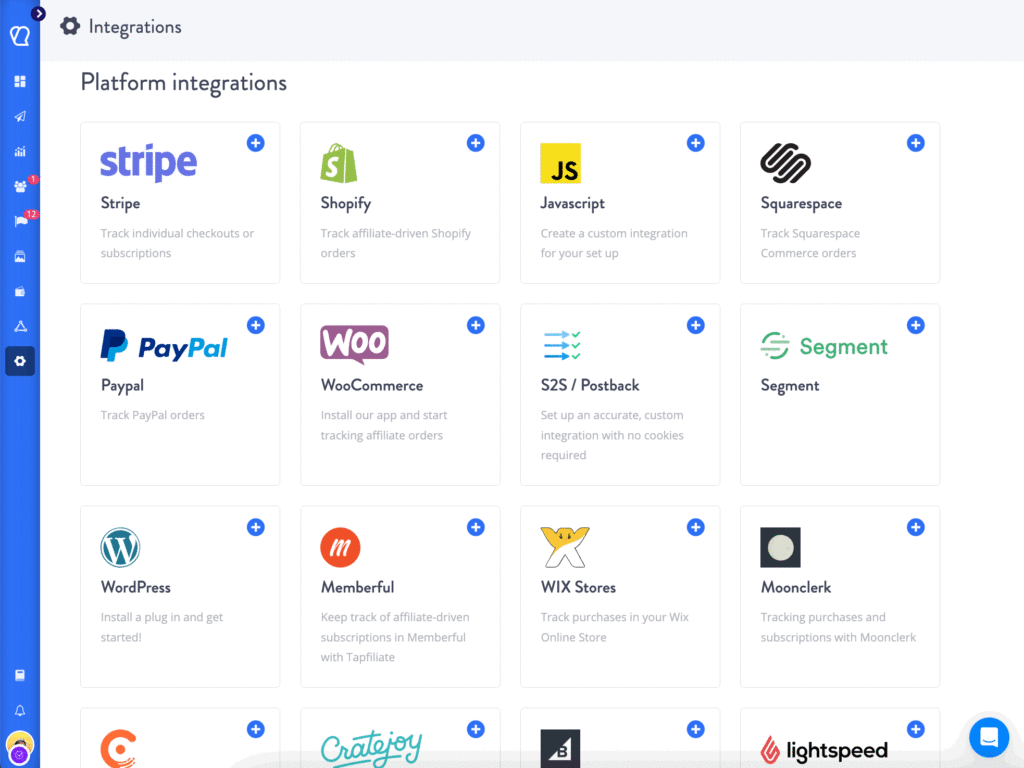
Tapfiliate connects natively to Shopify, Stripe, WooCommerce, and PayPal. It also connects to Zapier, which links to over 9,000 additional tools.
For Shopify: install the Tapfiliate app from the Shopify App Store and connect your store. Conversions start tracking immediately after installation.
For Stripe: link your Stripe account through Tapfiliate’s settings panel. Transactions sync automatically, and commissions are calculated on completed payments.
For other setups: use the JavaScript snippet or the REST API. Tapfiliate’s tracking and attribution tools support cookie-based tracking, server-to-server postbacks, and coupon code tracking simultaneously.
Test a real conversion before moving to step 3. Make an actual transaction through your connected store and confirm it appears in Tapfiliate’s dashboard. This takes about 10 minutes. It also catches any configuration issues before your affiliates are live.
Step 3: Import Your Affiliates into Tapfiliate
Tapfiliate accepts affiliate imports via CSV. Partner recruitment tools handle the import from your dashboard’s Affiliates section.
Your CSV file needs at least three columns: first name, last name, and email address. You can also include referral codes or custom affiliate group assignments. Full import instructions are available in the Tapfiliate Help Center
Format your Upfluence export to match this structure. Upload it through the Affiliates section. The system automatically creates accounts and sends each affiliate a welcome email with login instructions.
Two things to watch before you import:
Duplicates. If any email appears twice in your Upfluence export (which happens when an affiliate registered under two accounts), Tapfiliate will flag the conflict. Clean your list before uploading.
Inactive affiliates. This is also a good time to remove affiliates who have not generated a click or conversion in 90+ days. A clean import is easier to manage from day one.
After the import, each affiliate receives a unique Tapfiliate tracking link. Their old Upfluence links will stop working once you shut down that account. The communication in step 5 handles this, but flag it early so it does not catch anyone off guard.
Step 4: Recreate Your Commission Structure
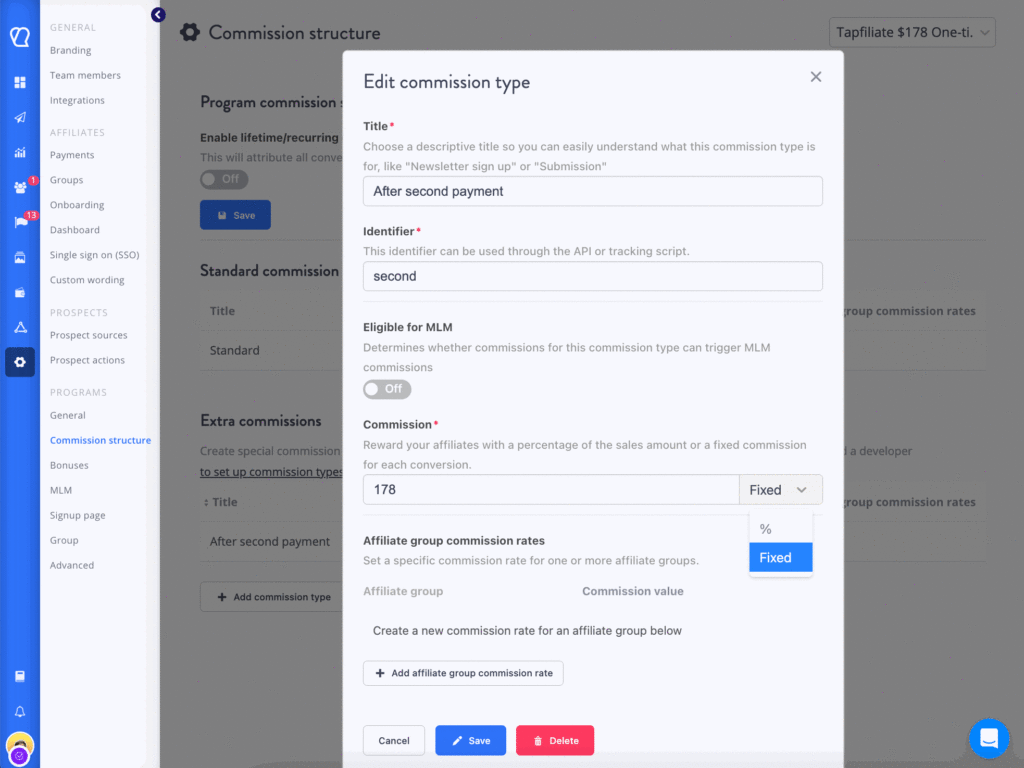
Tapfiliate’s flexible commission tools support fixed amounts, percentage-based rates, recurring commissions (for subscription revenue), and lifetime commissions.
Start by recreating your current Upfluence commission rates exactly. This keeps affiliates on familiar terms and removes friction during the transition.
After the migration is stable, consider what Upfluence did not let you do:
- Different commission rates per affiliate tier (bronze, silver, gold)
- Custom rates for specific affiliates without changing the base rate
- Performance bonuses that trigger automatically when an affiliate hits a revenue threshold
- Recurring commissions that pay out on every subscription renewal, not just the first sale
One rule: do not redesign your commission structure during the migration. Get the basics live first. Restructure in week 3 or 4, once tracking is confirmed and affiliates are active.
Automated payouts connect through Trolley directly from Tapfiliate’s payout settings. Affiliates get paid on schedule without manual batch processing.
Step 5: Communicate the Switch to Your Affiliates
This is the step most teams rush. It is also the step they most often regret rushing.
Affiliates dislike surprises. A sudden platform switch, with new tracking links and a new dashboard, reads as disorganized. Some affiliates will go inactive. A few will churn.
Send a migration email at least two weeks before you go live on Tapfiliate. Keep it short. Cover three things:
- Why did you switch (better tools for them, not just operational convenience for you)
- What changes (new dashboard URL, new tracking links)
- What stays the same (their commission rates, payout schedule, payment method)
Give a specific cutover date. Something like: “Your old tracking links will stop working on [date]. Your new link will arrive in a Tapfiliate welcome email before that date.”
Follow up 48 hours before the cutover. A second email cuts support tickets by a meaningful amount. Your top 10% of affiliates, the ones driving 80% of your revenue, deserve a personal note alongside the broadcast email.
Your First 30 Days on Tapfiliate

Week 1 is verification. Pull the real-time reporting dashboard and confirm click and conversion data matches your store’s order records. If the numbers diverge, the integration config is the first place to check.
Week 2 and 3 are about activating affiliates. Tapfiliate’s automation and workflows let you trigger emails automatically when an affiliate signs up, makes their first sale, or goes 30 days without a click. Set these up in week 1. They replace a significant amount of manual outreach going forward.
What I’ve noticed with most migrations: the teams that reach day 30 in good shape are the ones who ran a two-week parallel period. Both platforms stayed active. They used that overlap to confirm their conversion numbers matched in both systems. It adds a bit of cost. It removes a lot of anxiety.
Week 4: if your numbers match and your top affiliates are active, cancel Upfluence. Do not wait. Their billing runs until you cancel it. Tapfiliate’s customer base of over 69,500 active programs – across SaaS, e-commerce, and subscription businesses – is almost entirely made up of teams that moved from a broader marketing tool to a dedicated affiliate platform.
FAQs about Migrating from Upfluence to Tapfiliate
Is Tapfiliate better than Upfluence?
It depends on what you are running. Upfluence is built for influencer campaigns at scale. Its discovery database, outreach tooling, and campaign analytics are designed for brands managing many influencer relationships simultaneously. If that is your primary workflow, Upfluence fits it.
If you run an affiliate or referral program and need automated tracking, commission management, and a branded affiliate portal, Tapfiliate is the better tool. Most brands that migrated from Upfluence to Tapfiliate were using Upfluence as an affiliate platform and found it was not built for that job. Tapfiliate is purpose-built for affiliate program management, with faster setup, cleaner tracking data, and significantly fewer manual workarounds.
How long does it take to migrate from Upfluence to Tapfiliate?
Most programs complete the technical migration in 2 to 5 business days. The actual setup, account, integrations, and affiliate import takes a few hours. The remaining buffer time covers testing your tracking, communicating with affiliates, and verifying that conversion data matches your store records.
Larger programs with hundreds of affiliates or complex, multi-tier commission structures may need 1 to 2 weeks. Running a parallel period, where both platforms remain active simultaneously, is optional but reduces risk for programs with significant affiliate revenue.
Can I import affiliates from Upfluence to Tapfiliate?
Yes. Tapfiliate accepts affiliate imports via CSV. Export your affiliate list from Upfluence (names and email addresses), format it to match Tapfiliate’s import template, and upload it through the Affiliates section of your dashboard.
Each imported affiliate receives a welcome email with their new login credentials and a unique Tapfiliate tracking link. Their old Upfluence tracking links stop working when you shut down that account. This is why the affiliate communication step, covered in step 5 of this guide, matters as much as the technical setup.
Does Tapfiliate have an influencer database like Upfluence?
No. Tapfiliate does not include an influencer discovery database. It is not an influencer search tool. Tapfiliate manages affiliate partners: people and businesses that sign up to promote your product and earn commissions on the sales they generate.
If you use influencers as affiliates and track sales via unique links or coupon codes, Tapfiliate handles that well. But if influencer discovery and outreach is a core part of your marketing workflow, you would need a separate dedicated tool for that function. Tapfiliate and an influencer discovery platform can run in parallel without overlap.
What data can I export from Upfluence before switching?
Export four categories before you cancel: your full affiliate list (names, emails, commission rates), commission history and payout records, creative assets (banners, images, ad copy), and any custom tracking links or UTM parameters currently in use.
Do this before downgrading or canceling your Upfluence account. Access permissions change when you cancel, and in some cases, archived data becomes unavailable. Give yourself at least one full business day to download everything and confirm the exported files are complete and readable before you begin the Tapfiliate setup.
Migration from Upfluence to Tapfiliate: The Short Version
The migration takes a few days, not months. Export your data, set up Tapfiliate, connect your store, import your affiliates, rebuild your commissions, and communicate the switch before the cutover date.
The part that matters most is the affiliate communication. Affiliates who understand what is changing and why stay active. Affiliates who receive a new login email with no context often do not log in at all.
Start your free trial at Tapfiliate. Setup is fast. Tracking is live within minutes of connecting your store. And within the first week, you will know whether this was the right move.

Jessica Rangel
Spending my days writing marketing content, cycling around canals in Amsterdam, and attempting to master the Dutch language.
Similar articles























In this article
Why Marketers Are Leaving Upfluence in 2026
Upfluence vs. Tapfiliate: What Actually Changes
Before You Migrate: What to Export from Upfluence
Step 1: Set Up Your Tapfiliate Account
Step 2: Connect Your Store or Payment System
Step 3: Import Your Affiliates into Tapfiliate
Step 4: Recreate Your Commission Structure
Step 5: Communicate the Switch to Your Affiliates
Your First 30 Days on Tapfiliate
FAQs about Migrating from Upfluence to Tapfiliate
Migration from Upfluence to Tapfiliate: The Short Version
Get content like this, and more, sent directly to your inbox
Thank you!
We will contact you soon.
