
%27/%3E%3Crect width=%277%27 height=%275.08%27 fill=%27%233c3b6e%27/%3E%3C/svg%3E)
 Deutsch - DE
 Español - ES
 Français - FR
 Português - PT
How MCP Is Changing Affiliate Reporting


In this article
When Your Next Question Isn't on the Dashboard
Affiliate Reporting Has a Navigation Problem
First, What Is MCP?
What Changes When Reporting Starts With a Question?
So, Are Dashboards Dead Now?
What MCP Cannot Fix for You
What This Looks Like Inside Tapfiliate
How to Get Better Answers From Your Affiliate Data
Affiliate Reporting Is Becoming a Conversation
Frequently Asked Questions
If you work in marketing or SaaS, you’ve probably started seeing the letters MCP everywhere lately. Product announcements, AI tools, LinkedIn posts… suddenly everyone seems to support it.
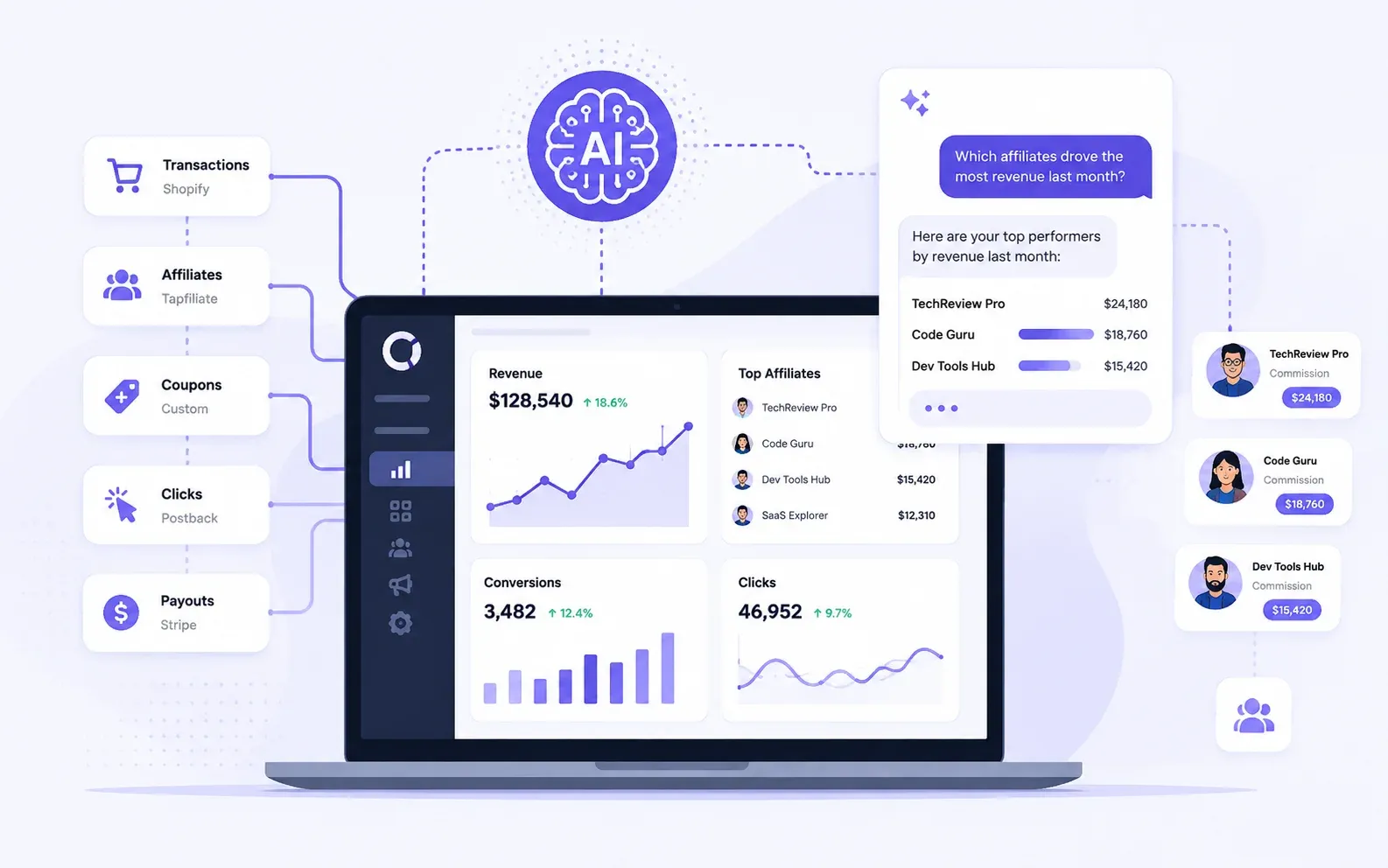
At first, it sounds like yet another AI buzzword. In reality, it’s a surprisingly practical shift. MCP gives AI assistants a standard way to connect directly to business software and work with live data instead of static exports.
Affiliate reporting is one of the clearest examples of what that looks like in practice.
TL;DR
- MCP lets AI assistants connect directly to business software and retrieve live data.
- For affiliate teams, that means asking questions in natural language instead of manually building reports.
- Dashboards aren’t going away, but ad hoc analysis becomes much faster.
- In this article, we’ll explain how MCP works, where it fits into affiliate reporting, and what it changes in practice.
When Your Next Question Isn’t on the Dashboard
You open your affiliate dashboard to answer one question.
Which partners brought in the most revenue last month?
Easy enough. The report is already there.
Then comes the second question: did those same partners also deliver the best return after commissions?
Now you need another report. Maybe an export. Possibly a spreadsheet. And while you are there, you notice that one affiliate sent twice as many clicks as usual but barely converted. So you start comparing date ranges, checking commission plans, and opening a few more tabs.
Forty minutes later, the original question has turned into a small research project.
This is the strange thing about affiliate reporting. Most platforms already collect plenty of data. Clicks, conversions, revenue, commissions, customers, payout details, and partner activity are all sitting there. Yet getting from “I have a question” to “I know what to do next” can still take far too long.
Model Context Protocol, or MCP, is beginning to change that.
With MCP, an AI assistant can connect to live data inside the tools you already use. So, instead of clicking through reports and translating your question into filters, you can ask it directly:
Which affiliates grew revenue last month, and which ones only increased traffic?
You open your affiliate dashboard to answer one question.
Which partners brought in the most revenue last month?
Easy enough. The report is already there.
And then:
Compare their commission costs and show me where our return improved.
The metrics have not changed while the way you reach them has.
Affiliate Reporting Has a Navigation Problem
Traditional dashboards are good at answering questions someone planned for in advance.
You can open a report and see your top affiliates, total revenue, conversions, or commission costs. You can change the date range, add a filter, and get a reliable overview of the program.
But affiliate managers rarely stop at the overview.
Imagine that revenue is down 12% this month. That number immediately creates more questions:
- Did traffic fall, or did conversion rates change?
- Was the decline spread across the program or driven by two major affiliates?
- Did any new affiliates offset part of the loss?
- Is the comparison fair, or did last month include a seasonal campaign?
- Which partners should you contact first?
The dashboard shows what happened. Understanding why it happened usually means moving between views, testing filters, comparing periods, and exporting data for another round of analysis.
None of this is impossibly difficult. Together, though, these small steps create enough friction that many useful questions are answered late or not at all.
And sometimes the problem is much simpler: you know the question, but you do not know which report contains the answer.
This matters because marketers are already working through a massive shift in how they use AI. According to HubSpot’s 2026 State of Marketing report, 61% of marketers believe AI is causing the industry’s biggest disruption in 20 years. Meanwhile, HubSpot reports that 67% of marketing teams using generative AI save ten or more hours per week.
So far, much of that saved time has come from content production and routine automation. Reporting is the next obvious place to look. There is a lot of repetitive work between having the data and getting a useful answer from it.
First, What Is MCP?
Model Context Protocol is an open standard that lets AI applications connect to external tools and data sources.
The name sounds highly technical. The basic idea is not.
Normally, an AI assistant only knows what you give it in the conversation. It cannot open your affiliate account, check last month’s conversions, or see which partners have gone quiet. You can upload an export, but then you are back to pulling files manually, and the information starts aging the moment you download it.
MCP creates a standardized bridge between the assistant and the business tool holding the data.
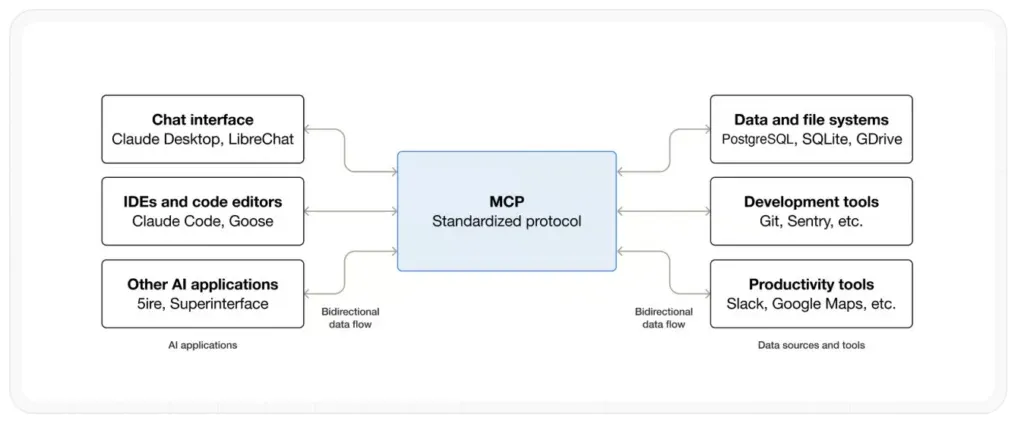
Affiliate platforms are only one example. The same approach can connect AI assistants to CRMs, analytics platforms, customer support tools, and internal business systems. Each connection gives the assistant access to a specific set of data or functions, depending on what the platform makes available and what the user authorizes. In this article, we are focusing on affiliate reporting because it shows the value of that broader shift particularly well: the data already exists, but reaching the right answer often requires far too much manual work.
Once you authorize the connection, the process looks something like this:
- You ask a question in everyday language.
- The assistant works out which data it needs.
- The MCP server retrieves that information from the connected platform.
- The assistant organizes the result and explains what it found.
Your affiliate platform remains the source of the numbers. The AI assistant gives you a new way to work with them.
If APIs have traditionally been the connection developers use to make two systems talk, MCP is the connection designed to let AI assistants use tools consistently.
And, importantly, you do not need to write an API request or know SQL every time you want an answer. You ask the way you would ask a colleague.
What Changes When Reporting Starts With a Question?
For years, self-service analytics mostly meant giving people more dashboards, filters, and charts.
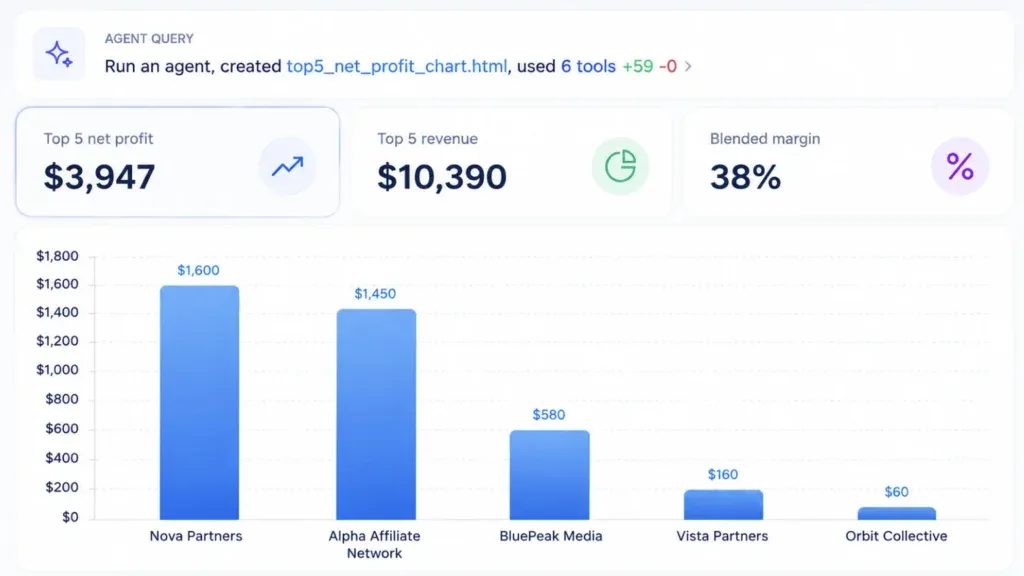
MCP introduces a different type of self-service. You describe what you want to understand, while the assistant handles much of the navigation and data retrieval behind the scenes.
You Can Follow the Question Wherever It Goes
Let’s say you ask:
- Which affiliates generated more than 100 clicks but no conversions in the last 30 days?
- You get the list. However, the useful part often comes next.
- Did any of them convert during the previous 30 days?
- Compare their landing pages and traffic changes.
- Which three should I investigate first?
A static report can answer the first question. A conversation lets you keep narrowing the analysis without rebuilding it every time.
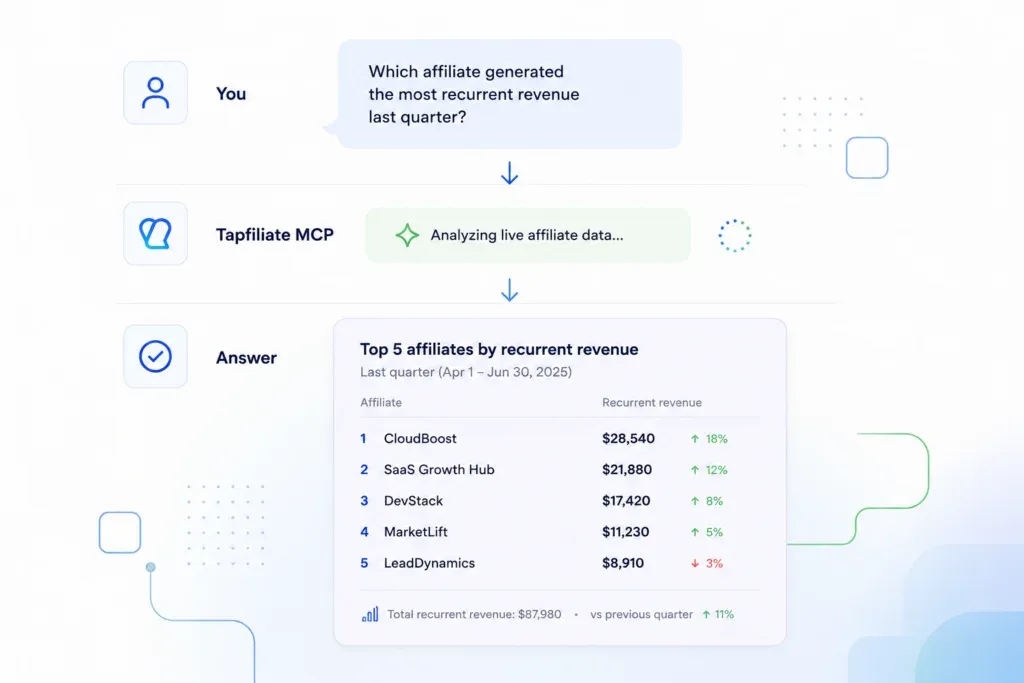
This is where MCP feels genuinely different from pasting a CSV into ChatGPT. The assistant can return to the live source, pull another slice of data, change the timeframe, or add a comparison as the investigation develops.

Ad Hoc Analysis Stops Being a Specialist Task
Not every affiliate team has a dedicated analyst. Quite often, reporting sits with a program manager or marketer who is also recruiting partners, reviewing applications, preparing campaigns, answering affiliate questions, and coordinating payouts.
That person may know the program inside out without knowing how to build every possible report.
Natural-language access lowers the technical barrier. If you can clearly explain what you need, you can investigate many everyday questions without waiting for someone else to create a dashboard or pull the data.
Of course, this does not suddenly turn everyone into a data scientist. It simply removes some of the tool knowledge that used to stand between the manager and the answer.
Reporting Happens While the Answer Can Still Change Something
Monthly reports are useful. They are also excellent at telling you what you should have noticed two weeks ago.
An established affiliate may stop converting without sending you a goodbye message. A new partner may join, show interest, and then never launch their first campaign. One affiliate’s conversion rate may suddenly jump far above the program average.
When checking those signals requires another manual report, it is easy to postpone the task until reporting day.
When it takes one question, you can check while there is still time to act:
- Contact an affiliate before they lose interest completely;
- Fix a broken landing page while traffic is still coming in;
- Support a new partner before the launch window passes;
- Review unusual activity before approving commissions;
- Adjust a campaign while it still has budget behind it.
So the real benefit is a shorter distance between noticing something and responding to it.
The Same Analysis Can Work for Different Audiences
Your CEO probably does not want the same report as your affiliate manager.
One needs a quick summary of revenue, commission spend, and overall direction. The other needs affiliate-level detail, conversion-rate changes, and a list of partners who require attention.
With an AI assistant, the underlying data can be shaped for each audience:
Give me a five-bullet executive summary of this quarter.
Now show the affiliate-level figures behind the two biggest changes.
Turn the comparison into a table for our weekly marketing meeting.
You still need to check any calculation that will influence a major business decision. But you no longer have to rebuild the same analysis three times just because three people need it in different formats.
So, Are Dashboards Dead Now?
No. And honestly, they do not need to be.
Dashboards are still the fastest way to monitor the metrics you check regularly. They give the whole team a stable view of program health and make it easy to spot obvious changes at a glance.
MCP is more useful when the question is specific, unexpected, or likely to create several follow-ups.
Think of the difference this way:
| Use a dashboard when… | Ask an MCP-connected assistant when… |
| You check the same KPIs regularly | You have a one-off or evolving question |
| The team needs one shared view | You need a custom comparison |
| A visual overview is enough | You want to investigate why something changed |
| The report structure is already defined | You are not sure which report holds the answer |
Spreadsheets still have a place too, especially for detailed modeling, combining data from several sources, or keeping an auditable record of a calculation.
The point is not to banish every dashboard and CSV from your life. It is to stop building a new one for every slightly different question.
What MCP Cannot Fix for You
This is where the excitement around AI usually gets a little ahead of reality.
MCP gives an assistant access to real data. It does not guarantee that the data is complete, that the question is well defined, or that every conclusion is sensible.
Bad Tracking Still Produces Bad Reporting
If conversions are missing, revenue values are incorrect, or attribution has been configured inconsistently, the assistant will work with those problems.
It can make flawed data easier to analyze. It cannot magically repair the tracking underneath it.
So, before asking AI to find trends, make sure the platform is receiving the events and values your program depends on.
Vague Questions Still Produce Vague Answers
Who is your “best” affiliate?
The partner with the most revenue? The highest profit after commissions? The most new customers? The strongest conversion rate among affiliates with meaningful traffic?
Those are four different answers.
For a useful result, include the timeframe, metric, minimum sample size, and comparison that matter to your decision.
An Outlier Is Not a Verdict
An unusually high conversion rate could mean fraud. It could also mean a small sample, a great audience fit, a coupon campaign, or a tracking issue.
The assistant can point you toward activity worth reviewing. A human still needs to decide what it means.
That review matters. McKinsey’s 2025 State of AI survey found that high-performing AI organizations are more likely to define when model outputs require human validation. Affiliate teams should apply the same discipline, especially when a conclusion affects commissions, payouts, fraud investigations, or partner relationships.
What This Looks Like Inside Tapfiliate
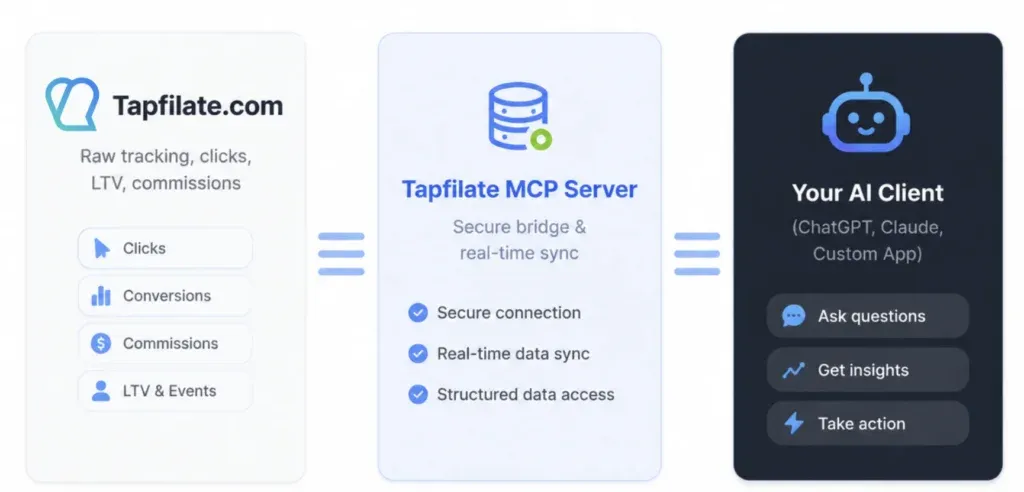
We recently introduced Tapfiliate MCP, which connects your Tapfiliate workspace to compatible AI assistants such as Claude, Cursor, and Google Antigravity.
Once connected, you can ask questions about the live data already available in your account, including clicks, conversions, customers, revenue, commissions, payouts, conversion rates, commission plans, and affiliate activity.
For example:
Who are my top affiliates by revenue this quarter, and how did they perform compared with the previous quarter?
Which active affiliates sent more than 100 clicks but generated no conversions in the last 30 days?
Which affiliates used to convert but have gone quiet this month?
Compare our commission plans by revenue, conversions, and commissions paid.
Show me conversion-rate outliers and explain why each one may deserve a closer look.
Give me a quick program summary and tell me what I should investigate this week.
The current version is built for analytics and is read-only. That means the assistant can retrieve data, compare performance, and surface trends, but it cannot create payments or edit affiliate details in your account.
Access is authorized through OAuth. To connect it, you need an active Tapfiliate account with Admin permissions and API/Zapier access enabled. Then you add the Tapfiliate MCP server to a supported AI assistant and authorize the connection.
The complete setup takes only a few steps, and our Tapfiliate MCP Help Center guide walks you through each one.
How to Get Better Answers From Your Affiliate Data
You do not need a 500-word prompt. Still, a few extra details can save you from a very confident answer to a slightly different question.
Give It a Timeframe
“Who is underperforming?” is open to interpretation.
“Which affiliates had at least 100 clicks and no conversions between July 1 and July 31?” is much clearer.
Say How You Want Performance Measured
If you ask for top affiliates, specify whether you mean revenue, conversions, profit, or another metric.
Add a Useful Comparison
A conversion rate of 4% means more when you compare it with the previous month, the program average, or affiliates in the same campaign.
Ask to See the Numbers Behind the Summary
If the assistant flags a trend, ask which affiliates were included, which threshold it used, and what figures support the conclusion.
Keep Findings and Recommendations Separate
Try this:
Compare affiliate performance for the last 30 days with the previous 30 days. First, show the underlying figures and the largest changes. Then suggest three areas to investigate. Do not treat unusual activity as fraud without supporting evidence.
Now you can review the facts first and decide how much weight to give the recommendations.
Affiliate Reporting Is Becoming a Conversation
Affiliate managers are not short on reports. They are short on time to keep digging every time a number raises another question.
MCP changes the starting point.
You can begin with the thing you want to understand, follow the answer with another question, and keep going until you reach something useful enough to act on. Meanwhile, the underlying platform continues doing what it should do: tracking affiliate activity and keeping the source data in one place.
Will you still open a dashboard? Absolutely.
Will you still export data sometimes? Probably.
But the next time someone asks why affiliate revenue dropped, you may not have to spend the next hour building a report before the real analysis can even begin.
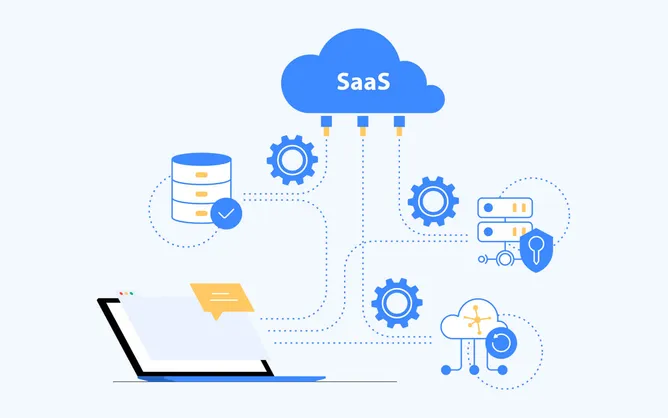
And that is where MCP can make affiliate reporting feel very different. It is one practical version of a wider change already starting across SaaS: software is becoming something AI can work with directly, while people spend less time carrying information from one system to another.
Frequently Asked Questions
What Does MCP Stand for in Affiliate Reporting?
MCP stands for Model Context Protocol. It is an open standard that allows compatible AI assistants to connect to external tools and data sources. For affiliate teams, this can provide conversational access to current program data.
Does MCP Replace Affiliate Reporting Dashboards?
No. Dashboards remain useful for recurring KPI monitoring and shared reporting. MCP is particularly helpful for ad hoc questions, comparisons, and follow-up analysis.
Can MCP Improve Reporting Accuracy?
It can reduce manual copy-and-paste work and the use of outdated exports because the assistant retrieves data from the connected source. However, it cannot correct missing conversions, inaccurate revenue values, or other problems in the original tracking data.
Can Tapfiliate MCP Change Data in My Account?
The current Tapfiliate MCP is read-only. It can retrieve and analyze data, but it cannot create payments or edit affiliate details.
Do I Need Technical Skills to Use Tapfiliate MCP?
You do not need SQL or API knowledge for everyday use. Once the connection is set up, you can ask questions in natural language. Setup steps vary slightly by AI assistant and are covered in the Tapfiliate Help Center.
Curious what questions you could ask your own affiliate program?
Try Tapfiliate MCP and explore your data through natural language. Whether you’re investigating performance, comparing time periods, or looking for unexpected trends, your answers are only a question away.
Learn more about Tapfiliate MCP →
Similar articles



































































































































































































































































In this article
When Your Next Question Isn't on the Dashboard
Affiliate Reporting Has a Navigation Problem
First, What Is MCP?
What Changes When Reporting Starts With a Question?
So, Are Dashboards Dead Now?
What MCP Cannot Fix for You
What This Looks Like Inside Tapfiliate
How to Get Better Answers From Your Affiliate Data
Affiliate Reporting Is Becoming a Conversation
Frequently Asked Questions
Get content like this, and more, sent directly to your inbox
Thank you!
We will contact you soon.