

 Deutsch - DE
  Español - ES
  Français - FR
  Português - PT
 Stripe Affiliate Tracking: Your Complete Integration & Setup Guide


In this article
The Problem Nobody Talks About
Why Stripe Alone Doesn’t Support Affiliate Tracking
How Stripe Affiliate Tracking Works: The Complete Flow
Top 5 Stripe Affiliate Tracking Platforms (2026)
Stripe + Tapfiliate Integration: No-Code Setup Guide
Affiliate Commission Structures & Automation on Stripe
Handling Refunds, Cancellations & Disputes in Affiliate Tracking
Frequently Asked Questions: Stripe Affiliate Tracking
Real-World Examples: SaaS Businesses Using Stripe + Affiliate Tracking
The Open Loop Closes
TL;DR
Stripe doesn’t track affiliates. You need third-party software. This guide walks you through Stripe affiliate tracking setup, compares five platforms, and shows how to automate commissions in 30 minutes without code.
The Problem Nobody Talks About
You’ve just processed your first $10,000 in Stripe payments.
Your affiliate sent you a Slack message: “Hey, where are my commissions?”
You open Stripe. You search the dashboard. You find… nothing. No affiliate tracking. No commission calculations. No way to see which partner drove that revenue.
This is the moment most businesses realize: Stripe alone cannot track affiliates.
Stripe processes payments. It does not track relationships. It cannot link a customer’s purchase back to a specific affiliate link or partner. This attribution gap directly impacts revenue for companies running affiliate programs.
The question isn’t whether you need Stripe affiliate tracking. It’s which platform to use.
Why Stripe Alone Doesn’t Support Affiliate Tracking
What Stripe Actually Tracks
Stripe tracks one thing: money in and money out.
When a customer pays, Stripe records the transaction amount, customer email, and payment method. It does not record how the customer arrived. It does not know if they clicked an affiliate link, used a promo code, or found you on Google.
This is intentional design. Stripe’s job is payments. Yours is to capture the relationship.
Why You Need Affiliate Software
Affiliate software sits between your marketing channels and Stripe.
It injects tracking identifiers into affiliate links. When a customer clicks, the software records the click. When they purchase on Stripe, the software matches the purchase to the click and credits the affiliate.
This layered approach works because affiliate software controls the tracking before the payment occurs. Learn more about affiliate tracking methods to understand the full spectrum of available approaches.
How Stripe Affiliate Tracking Works: The Complete Flow
Step 1: Choose Your Affiliate Platform
You select an affiliate platform (Tapfiliate, Trackdesk, Rewardful, or similar).
You create affiliate accounts for your partners. The platform generates unique tracking links for each affiliate.
Step 2: Generate Tracking Links
Each affiliate link contains a unique identifier in the query string.
Example: yoursite.com/?ref=partner_name or a short code like yoursite.com/?aid=12345.
When someone clicks the link, the affiliate platform’s tracking pixel fires. It records: the affiliate ID, timestamp, device fingerprint, and source URL.
Step 3: Monitor Conversions in Real-Time
Your customer clicks the link and navigates to your site.
They add items to a cart. They reach Stripe Checkout.
Here’s where the magic happens: Your affiliate platform watches for Stripe’s payment confirmation webhook. When the payment succeeds, your platform matches the customer’s session to the recorded click and attributes the sale to the affiliate.
Real-time dashboards show conversions, payouts, and ROI for each partner.
Step 4: Automate Commission Payouts
Your affiliate platform calculates commissions based on rules you set.
Commissions payout to your affiliates’ bank accounts, automatically via Stripe Connect or your payment processor.
No spreadsheets. No manual invoices.
Top 5 Stripe Affiliate Tracking Platforms (2026)
The affiliate software market has matured. Most platforms now integrate with Stripe in minutes, not weeks. See a detailed comparison of affiliate software solutions to understand how they differ. Here’s how the top players compare.
Trackdesk: Real-Time Monitoring Champion

Best for: Teams that want advanced real-time reporting.
Trackdesk excels at recurring payment tracking. Their dashboard shows live conversion data, coupon attribution, and commission totals instantly.
Pros:
- Real-time data feeds
- Advanced coupons & promo code integration
- Excellent API documentation
Cons:
- Higher pricing tier
- Steeper learning curve for non-technical users
Stripe Integration: 1-click via API. Setup takes 15 minutes.
Tapfiliate: The Comprehensive Solution

Best for: SaaS and subscription businesses.
Tapfiliate was built for Stripe from the start. They handle recurring subscriptions, refund logic, and chargeback reversal automatically.
Pros:
- Lifetime commissions for subscriptions
- Webhook-driven, no manual reconciliation
- Built-in compliance (GDPR, CCPAssistant)
- 30+ integrations beyond Stripe
Cons:
- Requires API key (though no developer needed for basic setup)
- More features means more options to configure
Stripe Integration: Connect via API Key in the Tapfiliate dashboard. Full setup guide here.
Rewardful: Simplicity First

Best for: Micro-SaaS and one-person teams.
Rewardful strips away complexity. Setup takes 5 minutes. The interface is minimal. The feature set is curated.
Pros:
- Fastest setup in the industry
- Built-in payouts via Stripe Connect
- Transparent pricing
Cons:
- Limited advanced features
- Best for simple commission structures
Stripe Integration: Install a JavaScript snippet or use the API webhook.
Partnero: The Growth Play
Best for: Businesses scaling affiliate programs.
Partnero focuses on affiliate recruitment and management. Their “invite and onboard” flow is smooth. Real-time tracking handles complex multi-tier structures.
Pros:
- Affiliate recruitment automation
- Multi-level commission support
- Growth-oriented feature set
Cons:
- Pricier than some competitors
- Best with larger affiliate networks (50+ partners)
Stripe Integration: 1-click setup via Stripe App Marketplace.
Referral Factory: The How-To Specialist
Best for: Businesses building referral programs from scratch.
Referral Factory combines affiliate software with educational content. If you’re new to Stripe affiliate tracking, their guides are thorough.
Pros:
- Excellent onboarding documentation
- Good for referral (vs. affiliate) programs
- Affordable entry price
Cons:
- Fewer enterprise features
- Smaller ecosystem of integrations
Stripe Integration: API webhook setup. Takes 20 minutes for first-timers.
Stripe + Tapfiliate Integration: No-Code Setup Guide
You’ve decided on Tapfiliate. Here’s how to connect it to Stripe without writing code.
Prerequisites & Account Setup
You need:
- A live Stripe account (not test mode)
- A Tapfiliate account (free tier available)
- Your Stripe API key (found in Stripe Dashboard > Developers > API Keys)
First, log into your Stripe account. Navigate to Developers. Copy your Secret Key. Keep it private. Never share it.
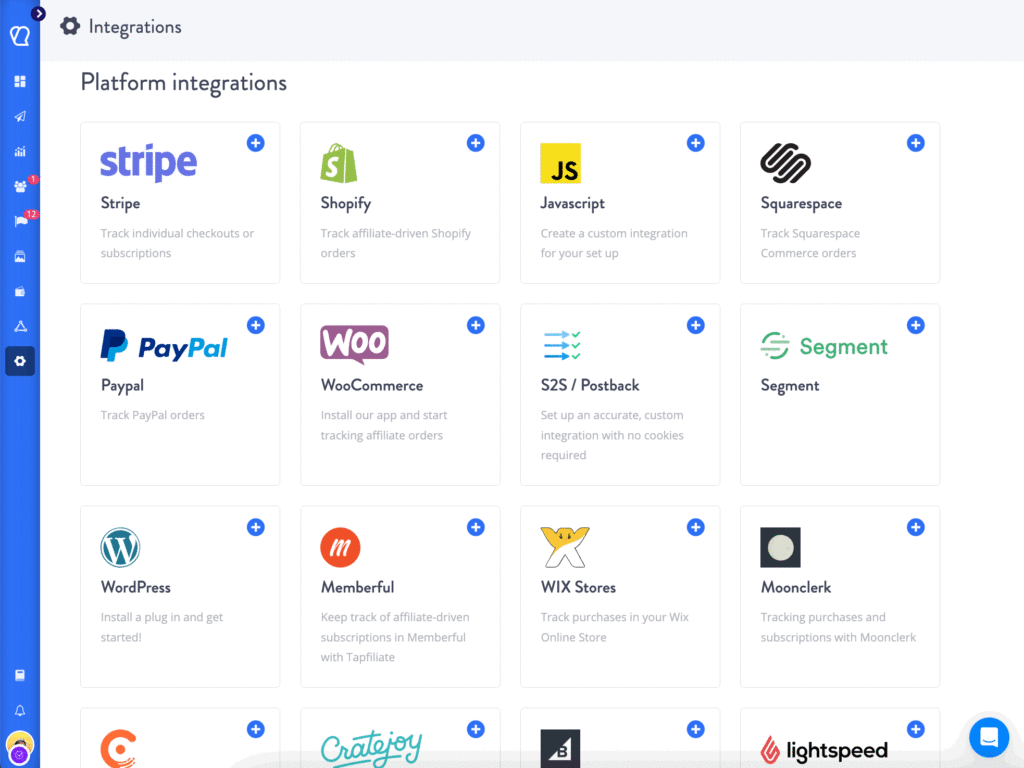
Next, log into Tapfiliate. Go to Settings > Integrations > Stripe.
Connecting via API Key
Paste your Stripe Secret Key into the Tapfiliate field.
Click “Connect.” Tapfiliate pings Stripe to verify the key. Within seconds, you’ll see a green checkmark.
Tapfiliate now has permission to read your Stripe payments and create webhooks.
Configuring Webhooks
Webhooks are the communication channel between Stripe and Tapfiliate.
When a payment succeeds in Stripe, Stripe sends a message to Tapfiliate: “New charge: $99, Customer: john@example.com, Reference: ch_1234567890”.
Tapfiliate reads this message and matches it to a tracked affiliate click. For a deeper dive, review the full API tracking guide on how conversions are captured server-side.
In Tapfiliate, go to Settings > Webhooks. You’ll see two webhook URLs.
Copy both URLs. Go to Stripe Dashboard > Developers > Webhooks. Click “Add endpoint.”
Paste the first Tapfiliate webhook URL. Select events: charge.succeeded and charge.refunded.
Save. Repeat for the second URL.
Stripe and Tapfiliate are now synced.
Testing & Going Live
Create a test affiliate account in Tapfiliate. Generate a tracking link.
Open an incognito window. Click the link. Complete a test purchase using Stripe’s test card: 4242 4242 4242 4242.
Wait 30 seconds. Check Tapfiliate’s dashboard. You should see the click and conversion recorded.
If it appears, go live. All test transactions will be ignored once you switch to live mode.
Troubleshooting Common Issues
Problem: Clicks recorded, but conversions don’t appear.
Solution: Verify the Stripe webhook is firing. In Stripe Dashboard > Developers > Webhooks > select the endpoint > scroll to “Events”. You should see successful pings. If not, your redirect URL may be missing the tracking parameter.
Problem: Conversions appear, but with wrong amounts.
Solution: Check your Tapfiliate commission rules. Are you calculating per-order or per-customer? Are refunds toggled on? Verify the formula matches Stripe’s actual charge amounts.
Problem: API key rejected.
Solution: Ensure you’re using the Secret Key, not the Publishable Key. Secret keys start with sk_live_ (live) or sk_test_ (test).
Affiliate Commission Structures & Automation on Stripe
Once your Stripe affiliate tracking is live, you configure how much affiliates earn.
Fixed Commission Models
You pay affiliates a flat amount per sale.
Example: $25 per customer signup. $100 per annual subscription.
Best for: Predictable cost control.
In Tapfiliate, go to Affiliate Program > Commission Settings. Select “Fixed Amount.” Enter the dollar value.
Percentage-Based Commissions
Affiliates earn a percentage of each sale.
Example: 20% per transaction. 15% per subscription month.
Best for: Aligning incentives (affiliates earn more when customers spend more).
In Tapfiliate, select “Percentage.” Enter 20. Save.
Stripe will now credit affiliates 20% of every transaction automatically.

Recurring & Lifetime Commissions
This is where SaaS and subscription businesses see affiliate leverage.
Suppose an affiliate brings you a customer who pays $99/month.
With recurring commissions, that affiliate earns 20% of every month’s payment for as long as the customer stays.
One click = recurring revenue.
With lifetime commissions, the affiliate earns 20% of the entire customer lifetime value.
In Tapfiliate: Program Settings > Commission Type. Select “Recurring” or “Lifetime.” Stripe handles the rest via webhook automation.
Refund Handling & Chargeback Logic
A customer requests a refund in Stripe.
Stripe’s webhook fires: charge.refunded.
Tapfiliate receives the message and automatically reverses the affiliate commission.
If the affiliate earned $20 from that sale, $20 is deducted from their next payout.
This prevents affiliate fraud. It also ensures accurate accounting.
You can customize rules: reverse immediately, or wait 30 days for chargeback disputes.
Handling Refunds, Cancellations & Disputes in Affiliate Tracking
This section addresses the messiest part of affiliate operations: what happens when things go wrong.
Automatic Commission Reversal
When a customer requests a refund, most Stripe affiliate tracking platforms automatically reverse the commission.
This is standard. It’s fair. It prevents fraudsters from profiting off fake sales.
The timeline: Refund initiates in Stripe > Webhook fires to your affiliate platform > Commission reverses instantly > Affiliate’s next payout is reduced by that amount.
Most platforms flag these reversals visibly. Affiliates see the notation in their dashboard.
Customer Churn & Cancellation Logic
Subscription customers cancel for many reasons.
If the cancellation happens within the first 7 days, many platforms consider it a “low-quality” lead.
Your commission rules can reflect this: 0% commission for cancellations within 7 days, full commission if they stay past day 7.
In Tapfiliate: Program Settings > Churn Rules. Define your window and payout logic.
Fraud Detection & Prevention
Bad affiliates exist. They use bots to generate fake clicks. They buy traffic cheaply and resell it as “organic.”
Modern Stripe affiliate tracking platforms detect this automatically.
Signals include: sudden click spikes from unusual IP ranges, suspicious device fingerprints, or conversion rates that exceed industry norms (>90% conversion is a red flag).
Platforms flag these for manual review. You can disable the affiliate or investigate further.
Frequently Asked Questions: Stripe Affiliate Tracking
Why Can’t Stripe Track Affiliate Links Directly?
Stripe processes payments but doesn’t natively track affiliate relationships. It cannot link a customer click to an affiliate referrer. Third-party affiliate software bridges this gap by injecting tracking identifiers into links, attributing conversions, and automating commissions outside Stripe’s payment flow.
Do I Need a Developer to Connect an Affiliate Platform to Stripe?
No. Modern platforms like Tapfiliate, Rewardful, and Partnero offer 1-click integrations via API webhooks and no-code interfaces. Most Stripe affiliate integrations take 15 to 30 minutes. If you’re using REST API, a developer is optional; many platforms provide JavaScript-based alternatives.
How Are Refunds and Cancellations Handled in Affiliate Tracking?
Affiliate platforms monitor Stripe webhooks for refund_created and charge.refunded events. When detected, the system automatically reverses affiliate commissions or adjusts payouts proportionally. For subscriptions, cancellation webhooks trigger commission removal if within refund policies. Most platforms allow custom chargeback rules and fraud flags.
Which Stripe Affiliate Platform Offers the Best Recurring Commission Support?
Trackdesk, Tapfiliate, and Rewardful all excel at recurring commissions. Tapfiliate stands out with lifetime commission logic for subscription businesses, automatic webhook handling, and support for multiple commission tiers. Trackdesk focuses on real-time monitoring; Rewardful emphasizes simplicity for micro-SaaS.
Can I Use Affiliate Tracking with Stripe Checkout?
Yes. Hosted Stripe Checkout sessions must include tracking parameters (UTM codes or custom query strings) passed from affiliate links. Platform-specific solutions like Tapfiliate and Rewardful handle this automatically via API webhooks. Server-side tracking is recommended for production reliability and GDPR compliance.
Real-World Examples: SaaS Businesses Using Stripe + Affiliate Tracking
Theory is fine. Real numbers matter more.
Case Study 1: SaaS Company with $50K/Month Affiliate Revenue
A B2B software company selling project management tools faced a challenge: their direct sales team could handle 500 customers. But they had 2,000 interested buyers.
They built an affiliate program. Recruited 120 marketing partners. Used Tapfiliate + Stripe to automate tracking and payouts.
Within 6 months: 400 affiliate-driven customers, $50,000 in monthly affiliate revenue, and 22% of total company revenue coming from partners.
Payouts happened automatically every Monday. No spreadsheets. No chasing partners for invoices.
The lesson: Affiliate programs scale beyond what your sales team can handle.
Case Study 2: E-commerce Store Using Recurring Commissions
An e-commerce company selling subscription boxes struggled with affiliate ROI.
They paid affiliates flat fees per customer ($25 per signup). But customers cancelled after month 2. The affiliate earned their commission. The company earned nothing.
They switched to recurring commissions: 10% per month, every month the customer stays active.
Within 3 months, affiliates shifted strategy. Instead of chasing volume, they recruited quality customers. Churn dropped from 45% to 18%. Affiliate income rose 300%.
The lesson: Align affiliate incentives with your unit economics.
Case Study 3: Digital Product Creator’s Affiliate Growth
A course creator with 500 email subscribers wanted to grow without paid ads.
They recruited 25 content creators as affiliates. Offered 40% commission per course sale ($99).
Using Referral Factory + Stripe integration, they automated tracking and payouts.
By month 4: 2,800 new customers from affiliates, $277,200 in affiliate-driven revenue, and a self-sustaining acquisition channel.
The cost? $111,000 in affiliate payouts. ROI: 2.5x.
The lesson: Generous affiliate programs grow faster than you expect.
The Open Loop Closes
Earlier, we asked: how do you know which partner drove that revenue?
The answer is Stripe affiliate tracking.
It’s not magic. It’s a three-piece system: a tracking link, a webhook connection, and a commission rule.
Every dollar your affiliates drive now appears in your Stripe account, traced back to the partner who delivered it.
You pay them automatically. They recruit more partners. Your revenue compounds.
This is how Stripe becomes the nucleus of your affiliate program.
Start with Tapfiliate’s free tier. Generate your first tracking link. Process your first affiliate sale. Once you see the conversion appear automatically, the rest is scaling.
The infrastructure is built. The barrier to affiliate revenue is gone. Explore Tapfiliate’s full integration ecosystem to connect beyond Stripe and build a comprehensive affiliate network.
Start your free trial at Tapfiliate.com. Setup is 30 minutes. No commitment. Just launch.
Ready to launch an affiliate program in a few steps? Tapfiliate can help. Start our free trial today

Chrissy Kapralos
Chrissy Kapralos runs a Toronto-based writing agency called No Worries Writing Co. She’s passionate about helping businesses communicate and share their stories. When she isn’t writing about the latest tech and marketing content, you’ll find her traveling, cooking, or watching horror movies.
Similar articles








In this article
The Problem Nobody Talks About
Why Stripe Alone Doesn’t Support Affiliate Tracking
How Stripe Affiliate Tracking Works: The Complete Flow
Top 5 Stripe Affiliate Tracking Platforms (2026)
Stripe + Tapfiliate Integration: No-Code Setup Guide
Affiliate Commission Structures & Automation on Stripe
Handling Refunds, Cancellations & Disputes in Affiliate Tracking
Frequently Asked Questions: Stripe Affiliate Tracking
Real-World Examples: SaaS Businesses Using Stripe + Affiliate Tracking
The Open Loop Closes
Get content like this, and more, sent directly to your inbox
Thank you!
We will contact you soon.
