

 Deutsch - DE
  Español - ES
  Français - FR
  Português - PT
 How to Migrate from Influencity to Tapfiliate (Without Losing a Single Affiliate)


In this article
Why Teams Are Moving Away from Influencity
What Makes Tapfiliate the Right Move
What to Export from Influencity Before You Cancel
Setting Up Tapfiliate (Step-by-Step)
Migrating Your Affiliates and Discount Codes
Running Both Platforms in Parallel (and When to Cut the Cord)
Your First 30 Days on Tapfiliate
Migration from Influencity to Tapfiliate: The Real Bottom Line
FAQ
TL;DR: The migration from Influencity to Tapfiliate is an active process lasting 5-7 days within a 3-week transition window. Here’s the exact path.
- Influencity’s auto-tracking add-on costs $660/year in addition to the $318/month base plan. Most teams only find this out at renewal.
- Tapfiliate starts at $89/month flat, with affiliate tracking, coupon codes, and 30+ integrations included by default.
- Your full affiliate list imports via CSV in under 10 minutes. New referral links are generated automatically upon upload.
- Historical commission and payment data cannot be transferred. Export it before you cancel, or it’s gone.
- Running both platforms in parallel for 2-3 weeks closes all conversion-tracking gaps during the switch.

Why Teams Are Moving Away from Influencity
Influencity is genuinely good at what it does. Finding influencers, filtering a 200-million-profile database, running AI engagement forecasts, and flagging fake accounts. It’s one of the stronger discovery tools out there. That’s worth saying up front.
But discovery is a one-time problem. Attribution is ongoing.
And Influencity charges separately for the ongoing problem. The auto-tracking add-on that connects influencer posts to actual conversions isn’t included in any base plan. It’s $660 per year extra, on top of the $318/month Professional plan, just to get automatic conversion attribution for 50 influencers. Many marketing teams don’t realize this until the annual renewal lands.
That’s not the only gap. No in-platform messaging means every influencer reply lands in your email inbox, splitting the conversation across two tools at once. Outside of Shopify, integration support is nearly nonexistent. WooCommerce, Magento, Stripe, and most SaaS billing stacks aren’t covered. Onboarding runs 4-6 weeks, which is three to four times slower than the industry average.
At some point, the math stops working. If you’re paying for a discovery tool you’ve already finished using, plus a tracking add-on that doesn’t connect to your actual tech stack, what exactly is the $318/month buying?
That’s the question that leads most teams to start the migration from Influencity to Tapfiliate.
What Makes Tapfiliate the Right Move
Not switching tools. Switching strategy.
Influencity is built for brands still searching for the right influencers. Tapfiliate is built for brands that have found them and need to manage, track, and pay them at scale. Two different problems. One platform can’t solve both equally well, and trying to force it means you pay extra for whichever half it can’t handle natively.
The tracking difference
Tapfiliate tracks affiliates and influencers across three methods running in parallel: unique referral links, custom discount codes, and server-to-server (S2S) attribution. S2S doesn’t rely on third-party cookies. If a follower uses your influencer’s promo code without clicking a link, Tapfiliate still captures the conversion. That comes standard with every plan, no add-on required.

Pricing reality
Tapfiliate’s flat $89/month includes affiliate tracking, influencer tracking, discount codes, performance dashboards, and full API access. A brand on Influencity’s Professional plan ($318/month) plus the tracking add-on ($55/month) is spending $373/month, or $4,476/year. Tapfiliate covers the same tracking functions for $1,068/year. That’s over $3,400 in annual savings on tracking cost alone.
Integrations that actually work
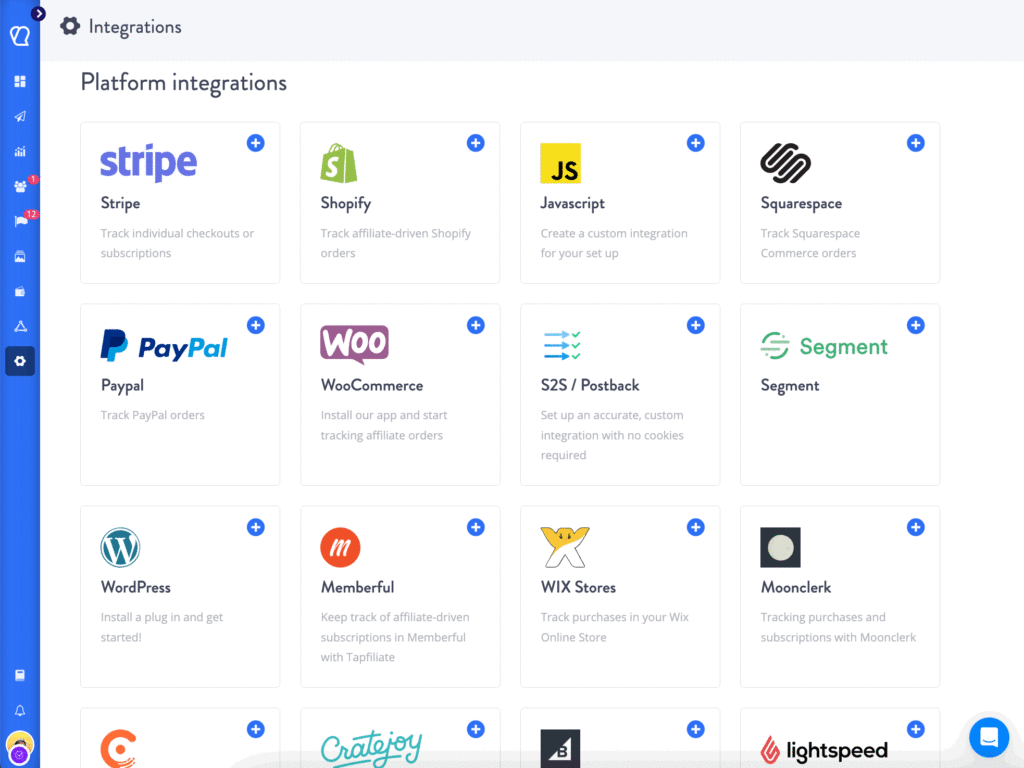
Tapfiliate connects natively with 30+ platforms: Shopify, WooCommerce, Stripe, Recurly, Chargebee, BigCommerce, Zapier, and more. View all integrations. If your revenue stack sits outside Shopify, this gap between the two platforms matters significantly.
What to Export from Influencity Before You Cancel
Stop. Don’t hit cancel yet.
Access ends the moment your Influencity subscription lapses. Any data you haven’t pulled is gone permanently. And you’ll need that data: migrating from Influencity to Tapfiliate without a performance baseline means you have no benchmarks to measure against in your new program. You’re starting blind on commission benchmarks if you lose this.
Export these three categories before you do anything else.
Your affiliate list
Open Influencity’s IRM (Influencer Relationship Manager) and export your full influencer list: first name, last name, email address, and any custom commission rates assigned. Tapfiliate’s CSV import template requires exactly this structure. If you’ve set individual commission rates for each influencer, note them separately. You’ll configure them in Tapfiliate individually after the import runs.
Commission history and payout records
Export your complete transaction history: every conversion event, every payout, every pending balance. Tapfiliate cannot import historical payment data. This isn’t a Tapfiliate-specific limitation. No platform can accept another platform’s payment records for compliance and privacy reasons. But you need that file for your own accounting records. And before you cancel, pay every affiliate their outstanding balance in Influencity. Don’t migrate unpaid commissions from the old system.

Creative assets
Download every banner, product image, and ad copy template distributed through Influencity’s campaign boards. You’ll re-upload these as marketing materials inside Tapfiliate, where affiliates access them directly from their own dashboards. It takes 20 minutes now. It takes much longer to recreate assets from memory later.
Setting Up Tapfiliate (Step-by-Step)
Start your Tapfiliate free trial and get the program fully configured before importing a single affiliate. Tracking must be verified and the commission structure set before affiliates land in the system. Importing into an unfinished setup creates problems you’ll fix retroactively.
Install the tracking script
Add Tapfiliate’s JavaScript snippet to your website, just before the closing </body> tag. On Shopify, it’s a one-click install from the app store. WooCommerce has a dedicated plugin. For custom or SaaS stacks, the manual snippet takes about 10 minutes to place.
After installation, fire a test conversion from a staging account. The Tapfiliate dashboard shows the event in real time. Green confirmation means you’re live and tracking correctly.
Configure your program settings
Set your commission structure before affiliates arrive. Options in Tapfiliate include flat-dollar amounts per conversion, percentage of sale value, tiered performance commissions, and product-specific rates. Also configure your affiliate signup page URL, custom domain, and cookie window. Tapfiliate defaults to 30 days. Adjust that to match whatever window you ran in Influencity.
The Tapfiliate migration support guide walks through every setting in sequence if you want the official documentation alongside this guide.
Test before you go live
Run at least three test conversions using a sandbox account. Confirm that conversion events register correctly, commission amounts calculate accurately, and attribution ties to the right affiliate record. A broken tracking setup on day one is much harder to explain to affiliates than a delayed launch. Test first, import second.

Migrating Your Affiliates and Discount Codes
This part is faster than most teams expect.
CSV import process
In Tapfiliate, go to Affiliates and select Import. Download the CSV template, map your exported Influencity list to the required fields (first name, last name, email), and upload. The import processes in minutes. New referral links generate automatically for every affiliate added. No manual link creation needed.
Each imported affiliate gets an email notification with their new Tapfiliate portal link and referral URL. They log in, grab their link, and they’re ready to go.
What I’ve noticed is that most teams delay this step because they’re anxious about the affiliate communication blast. Don’t overthink it. Affiliates who’ve been active on Influencity programs are used to platform transitions. A clear, direct email with their new link and a migration deadline is all it takes.
Coupon code transfer
Pull your full list of discount codes from Influencity. In Tapfiliate, go to Coupons and recreate each code with the corresponding affiliate assigned. Any sale that comes through that code, with or without a link click, is automatically attributed to the right influencer. This is one of the most underused steps when migrating from Influencity to Tapfiliate, and it’s the one that closes the biggest attribution gap.
Auto-generating new referral links
Tapfiliate referral links go live the moment affiliates are imported. These are the links you’ll ask affiliates to use going forward. The old Influencity-associated tracking stops working once you cancel that subscription.
The CSV is uploaded. Links are live. But your old tracking is still running in Influencity. Here’s why that timing gap matters and exactly when to pull the plug.

Running Both Platforms in Parallel (and When to Cut the Cord)
Run both platforms simultaneously for exactly three weeks. Not one. Not two. Three.
Affiliates need time to update every place they’ve shared their link: blog posts, YouTube descriptions, newsletter footers, and Instagram bios. If you cancel Influencity before they’ve switched, conversions still flowing through old links disappear. There’s no recovering those.
Here’s the timeline that works:
Days 1-7: Import affiliates to Tapfiliate. Send a migration email with each affiliate’s new link, a brief explanation of the switch, and a clear deadline at Day 21. Frame it honestly: better tracking, easier dashboard, lower platform costs for the program overall.
Days 8-21: Both platforms run concurrently. Check Tapfiliate conversion events daily. Any high-performing affiliate still routing through Influencity links after Day 14 gets a direct message from you, not another automated email.
Day 21: Export one final Influencity report. Cancel the subscription. Done.
In my experience, teams that skip the parallel period always have at least one affiliate who loses a full week of tracked conversions. That’s a trust problem at exactly the wrong moment.
Your First 30 Days on Tapfiliate
The migration is done. Now you build.
Days 1-7: Check the Tapfiliate dashboard daily. Confirm every affiliate’s link is generating clicks. Zero-activity affiliates from the first week are candidates for a direct outreach. Sometimes the import email lands in spam.
Days 8-14: Set up your first Tapfiliate campaign. Assign your top affiliates, upload your creative assets, and set a conversion goal. Tapfiliate’s influencer marketing features include campaign-level analytics that show you which influencer drove which sale, down to the individual transaction.
Days 15-30: Open recruitment. Tapfiliate has a built-in affiliate signup page you can share publicly. Point your influencer contacts there. The Tapfiliate affiliate program overview shows exactly what affiliates see when they apply.
By the end of 30 days, you’ll have cleaner ROI data than you had in 12 months on Influencity.
Migration from Influencity to Tapfiliate: The Real Bottom Line
Migration from Influencity to Tapfiliate is a week of active work spread across a 3-week transition window. Export first, configure second, import third, run parallel, then cancel.
The practical next step: start a Tapfiliate free trial while your Influencity subscription is still active. Don’t cancel first. Run the full setup, tracking script through test conversions, before you import a single affiliate. When everything checks out, upload the CSV and send the migration email.
Your affiliates don’t care which platform runs behind the scenes. They care that their links work and their commissions are accurate. Tapfiliate handles both.
FAQ
How do I migrate from Influencity to a new affiliate platform without losing data?
Export your affiliate list (names, emails, commission rates), your full transaction history, and your creative assets from Influencity before you cancel your subscription. Tapfiliate accepts affiliate data via CSV. New referral links are generated automatically upon upload. Historical conversion data cannot be imported to any new platform, so keep your export as a reference copy for your own records.
Running both platforms in parallel for 2-3 weeks closes the tracking gap. Affiliates who haven’t updated their links yet still generate conversions in Influencity during that window. Day 21 is when you cancel your Influencity subscription. No data disappears if you follow that sequence.
What data can be transferred when switching affiliate/influencer platforms?
You can transfer affiliate contact information (name, email), custom coupon codes, and creative assets. What you cannot transfer to any platform, including Tapfiliate, is historical conversion data, payout records, or customer purchase history. Privacy and compliance requirements on the source platform prevent this regardless of where you’re moving.
Export everything from Influencity in CSV format before your access lapses. You’ll retain a full audit trail for tax, accounting, and program performance comparison even if the data doesn’t live inside Tapfiliate itself.
Is Tapfiliate better than Influencity for affiliate tracking?
For specifically tracking affiliate and influencer performance, yes. Tapfiliate includes multi-method attribution via referral links, discount codes, and S2S as standard features. Influencity’s auto-tracking is a separate $660/year add-on. Tapfiliate also integrates with 30+ platforms, versus Influencity’s Shopify-only affiliate campaign coverage.
Influencity offers stronger influencer discovery features, including a larger searchable database, AI forecasting, and fraud detection. If your main job is finding new influencers from scratch, those features are competitive. If your main job is tracking and paying the ones you’ve already found, Tapfiliate is the better fit for that stage.
How long does it take to migrate to a new affiliate platform?
Active setup takes 5-7 days: export from Influencity, install Tapfiliate tracking, configure commission rules, import affiliates via CSV, and verify test conversions. The full migration window, including parallel running while affiliates update their links, lasts 3 weeks.
Avoid migrating in Q4 if possible. Many affiliates enter content and link-update freezes during October through December and won’t update tracking links until January. That extends your parallel period and delays the availability of clean data.
What are the main limitations of Influencity for affiliate tracking?
Four gaps drive most migrations away from Influencity. First: automatic conversion tracking is a paid add-on at $660/year for 50 influencers, not included in any base plan. Second: integration support is limited to Shopify for affiliate and gifting campaigns; WooCommerce, Stripe, and most SaaS billing tools aren’t supported. Third: there’s no in-platform messaging, so influencer outreach fragments between Influencity and email. Fourth: onboarding runs 4-6 weeks, significantly slower than most alternatives, including Tapfiliate, which most teams have live within a week.
Similar articles











In this article
Why Teams Are Moving Away from Influencity
What Makes Tapfiliate the Right Move
What to Export from Influencity Before You Cancel
Setting Up Tapfiliate (Step-by-Step)
Migrating Your Affiliates and Discount Codes
Running Both Platforms in Parallel (and When to Cut the Cord)
Your First 30 Days on Tapfiliate
Migration from Influencity to Tapfiliate: The Real Bottom Line
FAQ
Get content like this, and more, sent directly to your inbox
Thank you!
We will contact you soon.
