

 Deutsch - DE
  Español - ES
  Français - FR
  Português - PT
 Migration from Modash to Tapfiliate: The Exact Playbook to Switch Without Losing a Single Affiliate


In this article
Why Brands Are Moving from Modash to Tapfiliate in 2026
What You Can (and Cannot) Bring with You
The 4-Step Migration Playbook
How to Handle Pending Commissions and Payouts
Communicating the Switch to Your Affiliate Network
Common Migration Pitfalls (and How to Sidestep Them)
Modash vs Tapfiliate: What You’re Actually Gaining
Tapfiliate Features That Make the Switch Worth It
Your Migration Timeline: From Decision to Go-Live
FAQ: Migration from Modash to Tapfiliate
Migration from Modash to Tapfiliate: Your Next Move
TL;DR: Brands migrate from Modash to Tapfiliate to escape Shopify lock-in, payout fee caps, and rigid commission structures.
- Modash affiliate tracking only fully works for Shopify brands. WooCommerce, Stripe, and custom stacks lose gifting, code generation, and automated payouts.
- Tapfiliate’s $89/month Launch plan replaces Modash’s $499/month Performance tier for most affiliate program needs.
- Historical conversions, past payments, and original referral links do NOT transfer. Export everything before you migrate.
- Technical setup takes under 30 minutes. Full affiliate transition takes 6 to 8 weeks.
- Tapfiliate charges a flat fee with 0% revenue share and no annual payout caps. Modash Performance caps fee-free payouts at $10,000 per year

Why Brands Are Moving from Modash to Tapfiliate in 2026
The decision isn’t about Modash being broken. It’s about Modash being designed for a different job.
Modash is an influencer discovery and content tracking tool. It’s good at what it does. Find creators, monitor posts, track engagement. But when brands try to run a full-scale affiliate program through it, multi-tier commissions, cross-platform attribution, subscription payouts, and non-Shopify stores create friction fast.
The walls aren’t always obvious at first. The Modash Performance plan at $499 per month looks like it handles affiliates. And it does, up to a point. But that point comes faster than most teams expect.
Here’s what usually triggers the migration search.
A brand scales their affiliate program. Payouts cross $10,000 in a year. The Performance plan’s fee-free threshold has been reached. To remove that cap, you need Enterprise. Enterprise starts at $14,700 per year.
Meanwhile, Tapfiliate’s Scale plan sits at $179 per month. Flat fee. No revenue share. No payout volume caps.
That math is hard to ignore. A brand paying $499 per month on Modash Performance and then upgrading to Enterprise at $14,700 per year is spending $17,688 annually. Tapfiliate Scale costs $2,148 per year. That’s a gap of over $15,000 annually for the same core affiliate tracking functionality.

The scenario repeats across industries. An ecommerce brand running a 150-person affiliate program hits Modash’s 100-creator limit on Essentials and upgrades to Performance. Commissions start scaling. The $10,000 annual payout cap appears. The team looks at alternatives.
Or a SaaS company tries to set up recurring commissions for subscription referrals. Modash’s affiliate module handles basic rates but doesn’t natively support monthly recurring structures for software products. The workaround gets complicated. Someone searches for a dedicated affiliate platform.
That search leads here.
It’s not always about cost, though. Sometimes the trigger is purely functional.
A subscription business tries to configure monthly recurring commissions for SaaS referrals. Modash’s affiliate module supports basic structures but recurring, lifetime, and multi-level commissions aren’t part of the core feature set. The workaround either requires manual intervention every billing cycle or custom development.
A non-Shopify brand tries to activate automated payouts for 80 affiliates. The feature requires Shopify integration. The brand is on WooCommerce. The feature simply doesn’t apply.
A growing program needs a white-label affiliate portal under their own domain and branding. Modash doesn’t offer a white-label partner portal. Affiliates see Modash branding on their dashboard.
Each of these is a point of friction that compounds over time. The migration from Modash to Tapfiliate happens when the friction crosses a threshold that’s hard to ignore anymore.
The Shopify-Only Problem with Modash Affiliate Tracking
Modash’s affiliate tracking, gifting, automated payouts, and discount code generation are tied to Shopify.
It’s on their feature pages. It’s not hidden. But a lot of teams don’t fully process the scope of that dependency until they’re deep into a setup that doesn’t work the way they expected.
If your brand runs on WooCommerce, BigCommerce, Magento, Squarespace, or a custom-built stack, Modash’s affiliate module is largely off the table. You can still use influencer discovery and content monitoring. But the affiliate infrastructure you’re paying for? Available only if you’re on Shopify.
Tapfiliate’s 30+ integrations cover Shopify, WooCommerce, Stripe, Zapier, Squarespace, PayPal, and more. No store platform lock-in.
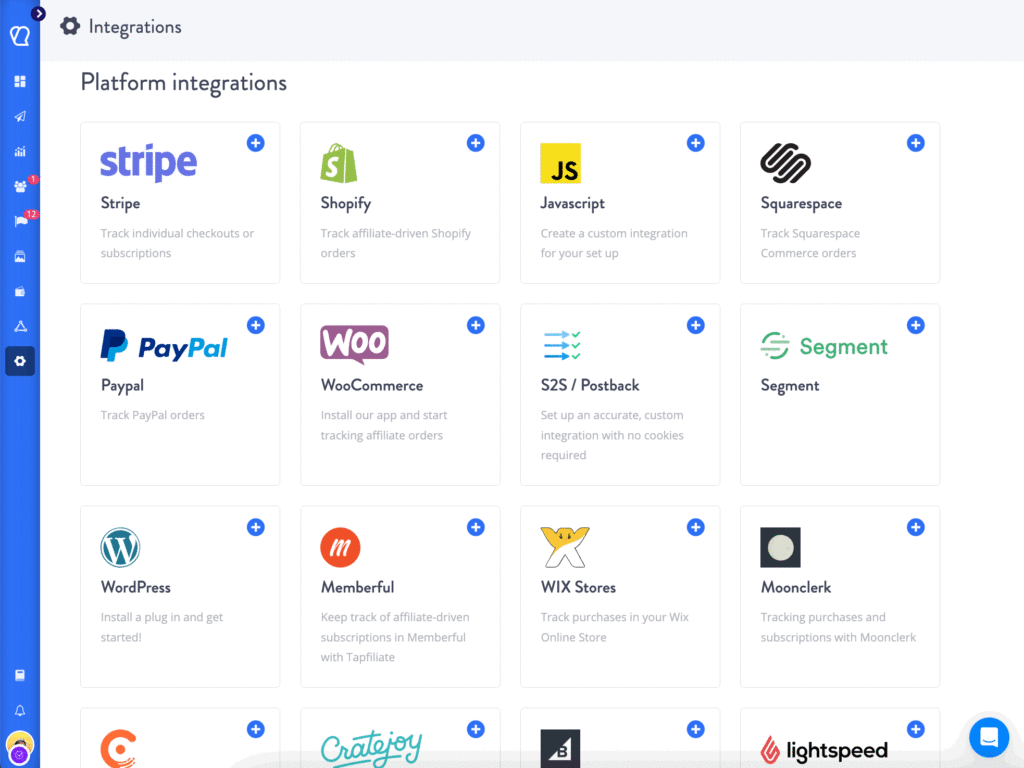
This is where the migration from Modash to Tapfiliate shifts from optional to necessary. If your affiliate program runs on anything other than Shopify, you’re paying Modash Performance rates for capabilities that simply aren’t available to you.
What Tapfiliate Gives You That Modash Doesn’t
The architectural difference matters more than a feature list.
Modash added affiliate functionality on top of an influencer marketing platform. Tapfiliate was built as an affiliate program management system from the ground up. That origin shapes everything: the commission engine, the partner portal, the integration depth, and the pricing model.
With Tapfiliate, you get:
- Percentage-based, fixed, tiered, recurring, lifetime, and category-specific commission structures, all from one dashboard
- A white-label partner portal under your own brand and domain
- Commission bonuses and group commission rules for affiliate tiers
- Real-time conversion attribution with click ID-based tracking
- Personalized coupon code tracking for influencer and offline campaigns
- Automated affiliate onboarding, recruitment pages, and approval workflows
- Flat-fee pricing with zero revenue share and zero payout caps

Modash’s affiliate setup works well for simple influencer-to-affiliate pipelines on Shopify. Once your program gets complex, different rates per product category, recurring commissions for SaaS subscriptions, multi-tier partner levels, you’re either building workarounds or upgrading to a platform built for it.
What You Can (and Cannot) Bring with You
Here’s the honest part of this guide. And it matters.
Not everything survives a migration from Modash to Tapfiliate.
Knowing this before you start prevents post-migration disputes, confused affiliates, and commission arguments that drag on for weeks. This section is where teams that rushed the process later wish they’d paid attention.
Data You Can Import
When you migrate from Modash to Tapfiliate, you can bring:
- Affiliate contact data: names, emails, payment information, account details
- Custom referral codes: affiliates can keep their preferred codes, which are assignable during import
- Program structure: commission rates, tier definitions, and bonus rules (rebuilt manually in Tapfiliate)
- Creative assets: banners, copy, brand guidelines, re-uploaded to Tapfiliate’s asset library
- Coupon codes: manually recreated in Tapfiliate and mapped to each affiliate
Tapfiliate’s support team handles the import process. Their step-by-step migration guide covers field mapping, CSV formatting, and import validation. The team can walk you through every step if this is your first platform migration.
Data That Doesn’t Survive the Move
This is what teams consistently underestimate.
- Historical conversion data: past sales records from Modash cannot be imported into Tapfiliate
- Past payment history: commission payout records stay in Modash’s system
- Customer-level transaction data: order histories don’t transfer
- Original referral links: every affiliate receives a new tracking link with a new 7-character code
The practical implication: before you close your Modash account, export every report you might ever need. Commission history, payout logs, customer attribution data, performance by affiliate. All of it.
Export it. Save it. You cannot pull it later.
The 4-Step Migration Playbook
Most teams try to move too fast. They set up Tapfiliate, disable Modash tracking, and spend the next three weeks fielding emails from affiliates whose links stopped working.
Here’s the process that doesn’t break things.
Step 1: Set Your Migration Date and Stick to It
Pick a go-live date 6 to 8 weeks from today. Not 2 weeks. Not “sometime next quarter.”
Your affiliates need time to update their links. Some of them have Modash tracking links embedded in YouTube descriptions, pinned tweets, evergreen blog posts, and podcast show notes. They need to find every single one and update it.
Your top 10% of affiliates likely drive 60 to 70% of your affiliate revenue. If those affiliates go dark for two weeks because their links stopped working, you feel the impact immediately.
Set the date. Put it in writing. Communicate it publicly. Hold to it.
Step 2: Export Your Data from Modash
Before anything else, pull the following from Modash’s reporting and admin panels:
- Full affiliate list with emails, payment details, and account status
- All-time commission and payout records, at minimum the last 24 months
- Conversion history by affiliate, sorted by date and value
- Active coupon codes and their affiliate mappings
- Campaign performance data for year-over-year comparisons after migration
- Any custom tier or group definitions you’ve built
Store these files in a secure location outside of Modash. Cloud storage with access controls is fine. What matters is that you own this data independently of any platform.
These are your financial records. Treat them that way.
Step 3: Import Affiliates into Tapfiliate and Configure Your Program
Start your Tapfiliate setup and complete the integration with your store. For most platforms, this takes under 30 minutes. The Zapier connection or native plugin install is the longest part.
Before you import your affiliates, complete the full program configuration:
- Commission structure: rates, tier rules, category-specific overrides, bonus conditions
- White-label portal: your brand logo, colors, and custom domain
- Creative asset library: banners, copy, brand guidelines
- Automated notifications: welcome emails, approval confirmations, commission alerts
- Payout rules: minimum thresholds, payment methods, and schedules
Then do a full end-to-end test. Make a real test purchase through your integration. Confirm the click fires, the conversion tracks, and the commission calculates correctly.

Do not import affiliates until this test passes. A broken tracking setup on day one creates a first impression you don’t recover from easily.
Once configured, import your affiliate list via CSV. Each affiliate gets a new Tapfiliate tracking link automatically. Assign custom codes that match their old codes where possible. Affiliates can also update their own codes from their dashboard.
When importing, the key mapping fields are email address, first name, last name, and preferred referral code. Tapfiliate’s import tool validates duplicates and flags any formatting errors before the import runs. Review the validation report carefully before confirming.
After import, affiliates receive an automated welcome email with their new dashboard link, their new tracking link, and their current commission rate. Configure this email before running the import so the first touchpoint is clean and professional.
Step 4: Run Parallel Tracking, Then Flip the Switch
For 2 to 4 weeks, run both platforms simultaneously.
Modash stays active for existing affiliate links. Tapfiliate goes live for new signups and for affiliates who’ve already updated their links. Monitor conversion volume on both platforms daily.
Watch for the crossover point: Tapfiliate traffic rising, Modash traffic declining toward zero. When Tapfiliate is capturing expected volume and Modash traffic has dropped to near-zero, you’re ready to close out.
Do not close your Modash account until you’ve cleared all pending balances.
But before we get to that, there’s one part of this process that most teams entirely underestimate. It’s not the technology and it’s not the data. It’s the money already sitting in the pipeline.
How to Handle Pending Commissions and Payouts
Pay everything out in Modash before migration day. All pending balances. Zero exceptions.
Pending commissions that sit unpaid when you close a Modash account become disputes. Affiliates have their dashboards screenshotted. They remember their numbers. Some will email you. Some will go public.
The standard you want to hold: zero pending balances on migration day.
Run a full payout cycle in Modash two weeks before your go-live date. Any conversions that occur in the final two-week parallel period, hold those in a manual tracking spreadsheet. Confirm attribution, then pay them out through Modash before closing.
In my experience, the teams that skip this step spend the following month answering support emails about missing commissions. The affiliates who didn’t get paid aren’t just annoyed. They stop promoting. Sometimes they tell their networks about it.
A clean payout before migration day is worth every minute it takes.
Tapfiliate starts fresh from go-live. Every commission it tracks is new. There’s no legacy balance to reconcile on the Tapfiliate side.
Communicating the Switch to Your Affiliate Network
Affiliates don’t like surprises. Especially when the surprise involves their income.
A well-executed migration announcement turns a potential churn event into a trust-building moment with your program’s most valuable partners. A poorly executed one costs you 20 to 30% of your affiliate base before the new platform ever goes live.
The Message That Keeps Affiliates From Walking
Your announcement email needs exactly three things, in this order:
- What’s changing and when: “We’re moving from Modash to Tapfiliate on [specific date]”
- What they need to do: “Update your referral links by [date]. Your new link is in your Tapfiliate dashboard.”
- What’s NOT changing: “Your commission rate stays the same. Your earnings during the transition are protected.”
Keep it short. Affiliates skim. If the action item is buried in the third paragraph, a meaningful percentage won’t find it. Lead with the change, explain the action, protect the relationship.
Timing Your Announcement (4 to 6 Weeks Out)
Send the initial announcement 4 to 6 weeks before go-live.
Follow with reminders at 2 weeks, 1 week, and 3 days before migration day. The reminder sequence matters. Many affiliates don’t act on the first email. The third or fourth touchpoint is where most link updates actually happen.
Your top affiliates, the ones generating more than 5% of your monthly affiliate revenue, get a personal message. Not the mass email. A direct message from you or your program manager: “Here’s what’s changing, here’s exactly what you need to do, and I’m here if anything doesn’t work.”
What I’ve noticed is that affiliate churn during migrations almost always traces back to one failure: the top affiliates didn’t receive personal outreach. The mass email got filtered. Nobody followed up. The affiliate assumed the program was winding down and quietly shifted to a competitor’s offer.
Thirty minutes of personal outreach to your top 10 affiliates is worth it. Every time.
Common Migration Pitfalls (and How to Sidestep Them)
These aren’t edge cases. They show up in nearly every migration that goes sideways.
1. Moving too fast.
The technical setup is fast. The affiliate transition isn’t. Some affiliates have your Modash tracking links embedded in evergreen content: YouTube videos with hundreds of thousands of views, blog posts ranking on page one, pinned social media content. They need time to find every link. Six weeks is minimum.
2. Skipping the end-to-end tracking test.
A broken integration that goes undetected for three days means three days of untracked conversions. Some of those conversions are gone permanently. Test a real purchase through Tapfiliate before you announce anything to affiliates.
3. Forgetting coupon code mapping.
If any of your affiliates used custom discount codes in Modash, those codes need to be manually recreated in Tapfiliate and mapped to the right affiliate accounts. Miss this and affiliates with coupon-based promotions will generate sales that don’t fire commission.
4. Closing Modash before the attribution window expires.
Keep Modash active for at least 30 days after go-live. Attribution windows vary by program. Some run 7 days, some run 30. A click that happened on day 1 of your parallel period might convert on day 28. Close Modash early and that conversion goes unattributed.
5. Launching before affiliates are ready.
You can be technically ready to go live in week two. But if your affiliates haven’t updated their links yet, going live early means tracking switches to Tapfiliate while traffic is still flowing through Modash links. Wait for the crossover.
6. Not updating your affiliate agreement.
Your affiliate program terms may reference Modash-specific tracking methods, attribution models, or cookie windows. Update your agreement before go-live to reflect Tapfiliate’s tracking setup. Affiliates should accept updated terms before their first Tapfiliate commission is generated.
7. Overlooking the grace period option.
Some programs offer affiliates a grace period: a window of 2 to 4 weeks where both the old Modash links and new Tapfiliate links earn commissions simultaneously. This prevents loss during the transition for affiliates who are slower to update content. If you choose to offer a grace period, set a clear end date and communicate it explicitly. Open-ended grace periods create accounting complexity and delayed account closures.
8. Not briefing your customer support team.
During the migration window, customers who used an affiliate referral link may contact support with questions. Your support team should know the migration is in progress, understand the basics of the new tracking setup, and be able to direct affiliate-related inquiries to your program manager. A confused support response to a referred customer reflects on your affiliate program’s professionalism.
Modash vs Tapfiliate: What You’re Actually Gaining
This isn’t a feature comparison.
It’s a program philosophy question.
Modash was built for brands that discover creators at scale and manage influencer relationships with Shopify as the commercial layer. It does that well. The influencer discovery database is large. The content monitoring is strong. The Shopify integration is tight.
Tapfiliate was built for brands that run affiliate programs as a primary growth channel, across any platform, with full control over every commission rule and partner experience detail.
The gap isn’t about which platform is better in an absolute sense. It’s about what problem each platform was architected to solve.
| Feature | Modash | Tapfiliate |
| Platform support | Shopify only (affiliate features) | 30+ platforms, no lock-in |
| Commission types | Basic + simple tiers | Tiered, recurring, lifetime, category |
| Pricing model | Per-plan + payout fee caps | Flat-fee, 0% revenue share |
| Affiliate count limits | 100 (Essentials), 250 (Performance) | Unlimited on Scale |
| Fee-free payout cap | $10,000/yr (Performance) | No cap |
| Built-in influencer discovery | Yes (380M+ profiles) | No |
| White-label portal | No | Yes |
| SaaS recurring commissions | No | Yes |
Most brands searching for migration from Modash to Tapfiliate have hit at least one of three walls:
- Platform lock-in: their store isn’t on Shopify, so Modash’s affiliate features don’t function properly
- Payout cap friction: their affiliate program has scaled past $10,000 per year in payouts, triggering Modash’s fee structure
- Commission complexity: they need recurring commissions, tiered rates, or category-specific structures that Modash’s affiliate module doesn’t support
Each of those walls has one answer: a platform built for affiliate programs, not one that added affiliate features to an influencer tool.
What you’re gaining isn’t just features. It’s architecture alignment. An affiliate program running on a platform designed specifically for affiliate programs tracks more cleanly, scales more predictably, and costs less per dollar of affiliate revenue generated.
Modash is the right tool if influencer discovery and Shopify-native creator management are your primary needs. If affiliate tracking, commission complexity, and multi-platform coverage are your primary needs, Tapfiliate is the right tool.
The migration from Modash to Tapfiliate isn’t a downgrade from a bigger platform to a smaller one. It’s a move to a platform whose entire product surface area is designed for the job you’re trying to do.
Tapfiliate Features That Make the Switch Worth It
Once you’re on Tapfiliate, here’s what actually changes day-to-day.
Commission Flexibility Modash Can’t Match
Tapfiliate supports percentage-based, fixed, tiered, recurring, lifetime, and category-specific commissions, all configurable without developer involvement.
You can set different rates for different product categories. Build bonus structures that fire when affiliates hit monthly revenue milestones. Create group commissions for affiliate tiers. Set up recurring commissions that fire every month for SaaS subscription customers an affiliate referred.

Modash’s affiliate module supports basic commission management and simple tier rules. For most influencer-to-affiliate pipelines, that’s enough. When it stops being enough and the program grows into real complexity, you need a different commission engine. Tapfiliate’s is purpose-built.
Influencer Tracking on Every Platform, Not Just Shopify
Tapfiliate’s influencer tracking program runs through affiliate links and personalized coupon codes, platform-agnostic and integration-agnostic.
Instagram posts, TikTok videos, YouTube descriptions, email newsletters, podcasts, blog reviews, Twitch streams. If a link can be clicked, Tapfiliate tracks it. If a discount code can be applied at checkout, Tapfiliate attributes that sale.
Attribution is real-time. Click fires. Conversion confirmed. Commission calculated. No Shopify required.
For brands running influencer programs outside Shopify, this is the core shift. Tapfiliate doesn’t constrain your tech stack.
Transparent Flat-Fee Pricing vs. Modash’s Payout Caps
The pricing math is worth spelling out clearly.
Modash Performance: $499 per month. Includes 250 tracked creators and affiliate management, but with 0% fee only up to $10,000 per year in combined payment and affiliate volume. Beyond that threshold, the fee structure changes. To remove payout caps entirely, you need the Enterprise plan starting at $14,700 per year.
Tapfiliate Scale: $179 per month. Flat fee. 0% revenue share. No payout volume caps. No affiliate count limits that force an Enterprise conversation.
For a brand with 100 affiliates generating $25,000 per month in attributed revenue, the difference between Modash Enterprise ($14,700/yr) and Tapfiliate Scale on annual billing ($1,788/yr) is approximately $12,900 per year. That’s the budget for more affiliate recruitment, higher bonuses, or better creative assets.
Your Migration Timeline: From Decision to Go-Live
Here’s a realistic 8-week schedule. Adjust based on your program size and affiliate count.
Weeks 1 to 2: Internal Setup
Select and activate your Tapfiliate plan. Complete the platform integration with your store, whether that’s Shopify, WooCommerce, Stripe, or another supported platform. Run an end-to-end test conversion to confirm tracking works correctly. Export all data and reports from Modash and store them securely. Begin recreating your commission structure and coupon codes in Tapfiliate.
This is also the time to audit your current program for complexity. If you have multiple commission tiers, category-specific rates, or bonus thresholds, document every rule before you start rebuilding them in Tapfiliate. A clean spec sheet prevents errors during setup.
Week 3: Prepare to Announce
Set up your white-label portal with your branding: logo, colors, and custom domain. Load the creative asset library with banners, copy, and brand guidelines. Configure automated onboarding emails and approval notifications. Write the migration announcement email and the personal outreach templates for your top affiliates.
Do not send anything to affiliates yet. This week is internal preparation only.
Week 4: Announce to Affiliates
Send the migration announcement to your full affiliate list. Send personal outreach to top-tier affiliates, those driving more than 5% of your monthly affiliate revenue. Begin accepting affiliate dashboard logins and link update questions. Open parallel tracking: Tapfiliate live for new signups, Modash stays active for all existing links.
Weeks 5 to 6: Transition Period
Monitor conversion volume on both platforms daily. Send reminder emails at 2 weeks and 1 week before go-live. Support affiliates who are updating links in embedded content. Run a full payout cycle in Modash for all pending balances.
This period is where most of the human coordination happens. Some affiliates will have questions about their new dashboard. Some will need help finding their new tracking link. A few will have old links published in content they can’t easily update. Have a plan for each scenario.
Week 7: Go-Live
Send the 3-day countdown reminder. Pay out all remaining Modash pending balances. Confirm Tapfiliate is capturing full expected conversion volume before disabling Modash tracking. On go-live day, Modash new tracking is disabled and Tapfiliate becomes the primary system.
Week 8 and Beyond: Wind-Down
Send a “migration complete” communication to your full affiliate list. Keep Modash active in read-only mode for 30 days post-go-live. At the 30-day mark, export your final Modash reports, then close the account. Review Tapfiliate data against your expected performance benchmarks and adjust commission rules if needed.
Total timeline for most programs: 6 to 8 weeks. Smaller programs with fewer than 50 affiliates and simple commission structures can move in 3 to 4 weeks. Enterprise programs with hundreds of affiliates should budget 10 to 12 weeks to handle the affiliate communication volume properly.
FAQ: Migration from Modash to Tapfiliate
How long does it take to migrate from Modash to Tapfiliate?
Tapfiliate can be set up and technically live in under 30 minutes. The full migration, including affiliate link updates and Modash wind-down, takes 6 to 8 weeks for most programs. The technical setup is fast. Getting every affiliate to update their embedded links, especially in evergreen content, is where the time goes. Budget 6 weeks minimum.
Can affiliates keep their referral links when switching to Tapfiliate?
No. Original Modash referral links cannot be ported to Tapfiliate. Each affiliate receives a new tracking link when imported. The link includes a 7-character tracking code that affiliates can customize to their preferred handle or brand name from their Tapfiliate dashboard. Build link update time into your migration schedule. Affiliates with published evergreen content need the most lead time.
What data can be imported from Modash into Tapfiliate?
Affiliate contact data (names, emails, payment details), custom referral codes, and commission structures can all be set up in Tapfiliate. The affiliate CSV import handles the contact data. Commission structures are rebuilt manually based on your existing Modash setup. Historical conversion data, past payment records, and customer transaction histories cannot be transferred. Export all of these from Modash before closing your account.
Does Tapfiliate offer a free migration service?
Yes. Tapfiliate provides free migration assistance through their support team. They help with affiliate list imports, integration setup, and tracking verification. Their migration support page outlines the process. For complex integration cases, custom API tracking, multi-store setups, or non-standard commission structures, their technical support team can advise directly.
Will affiliates lose pending commissions during migration?
Not if the migration is handled correctly. All pending balances must be paid out through Modash before migration day. Tapfiliate tracks only new conversions from go-live forward. The risk comes from closing your Modash account before paying out pending balances, or disabling Modash tracking before affiliates have updated their links. Clear all balances, maintain parallel tracking through the transition period, and close Modash only when both conditions are met.
Migration from Modash to Tapfiliate: Your Next Move
The migration is straightforward when it’s planned properly. It falls apart when teams rush the timeline or skip the affiliate communication.
Get your data out of Modash first. Every report, every payout record, every conversion log. Set a real timeline: 6 weeks minimum, 8 if your program is larger. Pay out every pending commission before go-live. Communicate personally with your top affiliates.
Tapfiliate’s technical setup is fast. The integration is clean. The commission engine handles whatever structure your program needs. And the flat-fee pricing removes the ceiling on what your affiliate program can earn.
If you’re ready to start, Tapfiliate’s migration support team handles the affiliate import and helps you configure your commission structure from scratch. The sooner the planning starts, the cleaner the cutover.
Start your free trial at Tapfiliate. Your tracking is live within minutes of connecting your first integration. And within the first week, you will know exactly what your affiliate program is worth when it is actually measured correctly.

Jessica Rangel
Spending my days writing marketing content, cycling around canals in Amsterdam, and attempting to master the Dutch language.
Similar articles











In this article
Why Brands Are Moving from Modash to Tapfiliate in 2026
What You Can (and Cannot) Bring with You
The 4-Step Migration Playbook
How to Handle Pending Commissions and Payouts
Communicating the Switch to Your Affiliate Network
Common Migration Pitfalls (and How to Sidestep Them)
Modash vs Tapfiliate: What You’re Actually Gaining
Tapfiliate Features That Make the Switch Worth It
Your Migration Timeline: From Decision to Go-Live
FAQ: Migration from Modash to Tapfiliate
Migration from Modash to Tapfiliate: Your Next Move
Get content like this, and more, sent directly to your inbox
Thank you!
We will contact you soon.
