

 Deutsch - DE
  Español - ES
  Français - FR
  Português - PT
 How to Migrate from Ainfluencer to Tapfiliate (Without Losing a Single Affiliate)


In this article
Why Brands Leave Ainfluencer (And What They Actually Need)
Ainfluencer vs. Tapfiliate: What Actually Changes
Before You Migrate: What to Export from Ainfluencer
Step 1: Create Your Tapfiliate Account
Step 2: Import Your Affiliates and Influencers
Step 3: Configure Tracking and Commission Rule
Step 4: Communicate the Switch to Your Creators
FAQ
Ready to Make the Switch?
TL;DR: Migrating from Ainfluencer to Tapfiliate takes under 30 minutes once your data is ready.
- Export your creator roster as a CSV before closing your Ainfluencer account
- Import affiliates into Tapfiliate; referral links generate the moment the CSV uploads
- Enable cookie-less tracking to capture every sale, including those blocked by iOS privacy updates
- Use the email template in Step 4 to notify creators before the switch goes live
Your influencer just drove 47 clicks to your product page. You have no idea.
Ainfluencer doesn’t track clicks. It doesn’t log conversions. It can’t tell you which creator sent which buyer, or if any buyer arrived at all. You paid for a post, you got a screenshot in return.
That’s not affiliate marketing. That’s a donation with extra steps.
This guide is for brands that have outgrown Ainfluencer’s flat-fee model and want real performance data from their creator partnerships. We’ll cover exactly what to export, how to import it into Tapfiliate, and how to set up tracking that survives ad blockers, iOS updates, and a privacy landscape that keeps changing.
This is not a “could work for your situation” overview. It’s a step-by-step migration from Ainfluencer to Tapfiliate, written for teams that are ready to run it this week.
By the end, you’ll have a live affiliate program. Your influencers become affiliates. Every sale gets attributed. And you’ll finally know which one or two creators are actually driving your revenue. The other eight are posting for the free product.
Why Brands Leave Ainfluencer (And What They Actually Need)
The tracking gap that costs you revenue
Ainfluencer’s model is built around flat-fee deals and an escrow payment system. You pay a creator upfront. They post. You hope something happens.
There is no conversion tracking. No click attribution. No real-time data showing which influencer drove $800 in sales last Tuesday.
Every untracked sale is revenue that simply disappears from your reports. If you run eight influencer campaigns a month, you have no way to know which two are profitable. You’re essentially A/B testing with a blindfold on.

When “free” gets expensive
Yes, Ainfluencer is free for brands. No monthly subscription. That’s genuinely useful for a first test campaign.
But free comes with a cost measured in blind spots. Wallet funds stay locked after refunds. Customer support is slow. Deliverable verification is manual. You review screenshots and compare post dates yourself.
For a scaling program with 20, 50, or 100 creators, that “free” platform is burning your team’s time at a rate that would pay for Tapfiliate many times over.
Tapfiliate starts at $89 per month. That’s roughly the cost of one influencer campaign going untracked and unreported.
Ainfluencer vs. Tapfiliate: What Actually Changes
Feature comparison
| Feature | Ainfluencer | Tapfiliate |
| Click and conversion tracking | No | Yes |
| Server-to-server / cookie-less tracking | No | Yes |
| Unique affiliate referral links | No | Yes |
| Coupon code tracking | Limited | Yes |
| Real-time reporting dashboard | No | Yes |
| Automated commission payouts | No | Yes |
| Shopify / Stripe / WooCommerce integration | Basic | 30+ integrations |
| Influencer + affiliate programs in one | No | Yes |
| Setup time | Variable | 30 minutes |
| Monthly pricing | Free (escrow model) | From $89/month (Launch plan) |
What you gain on Day 1
The day your first affiliate is imported into Tapfiliate, their referral link is live. Not in a queue. Not pending review. Immediately.
What I’ve noticed is that teams consistently underestimate how much that speed matters. Your influencers don’t need to negotiate a new agreement or wait for platform approval. They paste the link in their bio and the tracking starts.
Add server-to-server tracking and you capture sales that ad blockers would have erased entirely on a cookie-based setup. For mobile audiences coming from Instagram or TikTok, the attribution difference can be the gap between 60% accuracy and 95%.

Before You Migrate: What to Export from Ainfluencer
Don’t cancel your Ainfluencer account before you have a copy of everything. Tapfiliate cannot import historical conversions or payment records. That archive is your responsibility.
A good rule: close nothing until your first affiliate’s referral link in Tapfiliate is tested and confirmed working. That’s the signal that the migration is real, not just planned.
Your creator roster
Go to your Ainfluencer dashboard and export your full collaborator list. You need at minimum:
- Creator name (first and last)
- Email address
- Social platform and handle
- Agreed commission rate or deal terms
- Any branded coupon codes
This list becomes your Tapfiliate import CSV. Everything else is optional.
Historical deal data and payment records
Export every completed campaign with deal value, content link, and payout date. Keep this in a spreadsheet for your internal records. Tapfiliate won’t ask for it. Your finance team might.
Coupon codes
If your Ainfluencer creators used branded coupon codes (for example, “SARAH15”), you can carry them directly into Tapfiliate. The import tool accepts coupon codes as a CSV column and assigns them per affiliate automatically. No manual entry needed.
How to handle overlapping campaign windows
If you have active Ainfluencer deals still running while you set up Tapfiliate, don’t cut both platforms at once. Let any paid, in-progress campaigns finish on Ainfluencer. New deals go through Tapfiliate from day one.
This overlap window is typically one to two weeks. You’ll be paying for both platforms briefly, but the alternative is abandoning active creator campaigns mid-run. That costs more in creator goodwill than two weeks of dual subscription fees.
Once your last active Ainfluencer deal has completed and the 7-day escrow window clears, cancel. Not before. Premature cancellation has locked wallet funds for some brands for weeks while support cases worked through the queue.
Running both in parallel for a short window is not a failure of planning. It’s a clean handoff.
Step 1: Create Your Tapfiliate Account
Choose the right plan
Tapfiliate’s Launch plan starts at $89/month and covers unlimited affiliates, real-time reporting, 30+ integrations, and coupon code tracking. For teams running influencer and affiliate programs at the same time, the Scale plan at $179/month adds advanced commission management, automated payouts, and MLM-style multi-tier support.
No per-affiliate fees. No setup charges. One flat monthly price regardless of how many creators you import. You get full platform access to run the complete migration before your billing starts.
Not sure which plan fits your program size? Tapfiliate’s pricing page breaks down each tier by feature. Most brands migrating from Ainfluencer start on the Launch plan and upgrade once their affiliate program is generating consistent revenue.
Connect your store or app
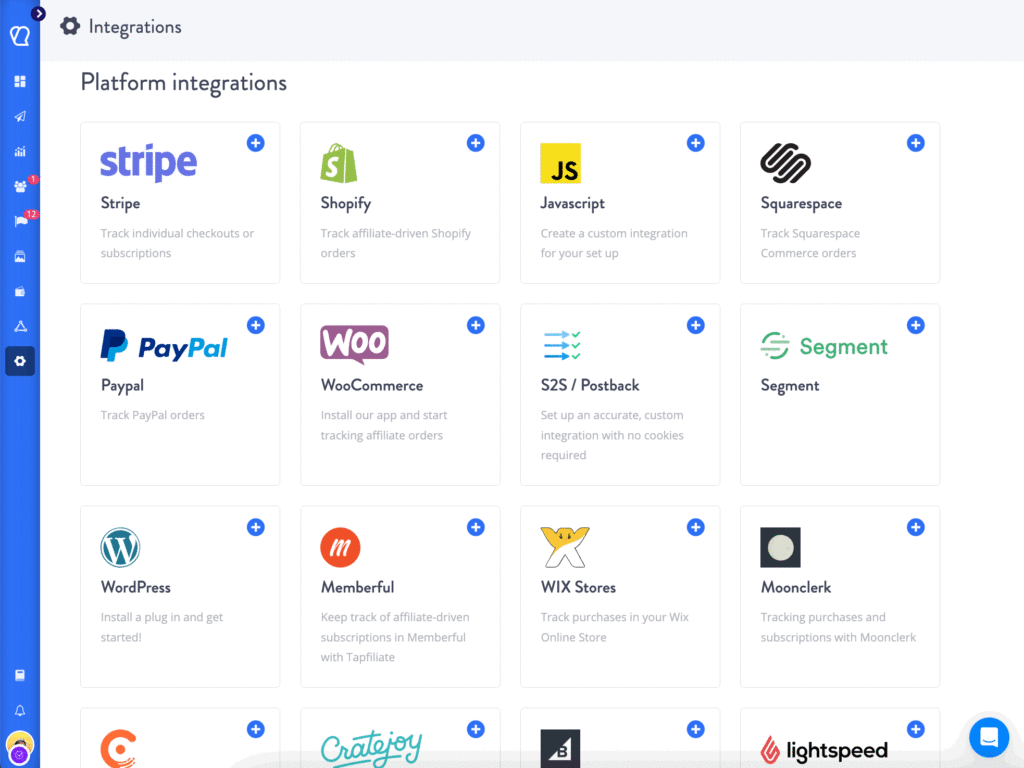
Tapfiliate integrates directly with Shopify, WooCommerce, Stripe, Squarespace, and 30+ other platforms. For most eCommerce stores, the connection takes under 30 minutes with no developer required.
Go to Settings, then Integrations. Pick your platform and follow the on-screen steps. The tracking script or server-to-server connector installs in a single click.
Step 2: Import Your Affiliates and Influencers
This is the fastest part of the migration from Ainfluencer to Tapfiliate. Most teams finish the import in under five minutes.
Prepare your CSV
Your import file needs these columns as a minimum: First Name, Last Name, Email. Add these if you have them: Phone, Coupon Code, Commission Rate.
A sample row:
Sarah, Johnson, sarah@example.com, SARAH15, 15%
Tapfiliate’s import tool maps each column header to the right field. If a header doesn’t match, you get a warning before anything is saved. No silent failures.
Set referral links and coupon codes
The moment the CSV uploads, Tapfiliate creates a unique referral link for each affiliate. They can log into their portal immediately and find it.
Coupon codes from the CSV are assigned automatically. Sarah’s “SARAH15” code starts tracking conversions from that minute with no additional setup on her end.
Your only job after this step: tell your affiliates their old Ainfluencer links no longer work and send them the new Tapfiliate link. (Step 4 has an email template ready to copy.)

Step 3: Configure Tracking and Commission Rule
Cookie-less and server-to-server tracking
Here’s the thing that Ainfluencer never offered: attribution that doesn’t depend on a browser cookie surviving the buyer’s journey.
Tapfiliate supports server-to-server (S2S) tracking. When a purchase fires in your backend, Tapfiliate records it directly from server to server. The buyer’s browser settings are irrelevant. Ad blockers can’t interrupt it. Apple’s Intelligent Tracking Prevention doesn’t apply.
To enable S2S tracking, go to Settings, then Tracking, and select the server-side integration for your platform. For Shopify, this is a one-click activation. For custom stores, Tapfiliate provides a REST API endpoint that fires on your order confirmation event. The full setup takes under 20 minutes for a developer with basic API experience.
Once it’s active, every conversion fires server-to-server regardless of how the buyer arrived. Mobile, desktop, app, privacy browser: it doesn’t matter. The sale gets attributed.
For programs running on Instagram and TikTok, where buyers come through mobile apps that strip cookies by default, this tracking method is the difference between accurate data and expensive guesswork. Read more about hybrid influencer tracking with affiliate software to see how the setup works end to end.
Commission structures
Tapfiliate supports three commission models:
Flat fee per conversion: Pay a fixed amount per sale, regardless of order size (e.g., $10 per conversion).
Percentage of sale: Pay a share of each order total (e.g., 15% of cart value).
Tiered commissions: Increase rates as affiliates hit volume milestones (e.g., 10% for the first 20 sales, 15% after that).
You can also set program-level defaults and then override them per individual affiliate. So if one creator drives significantly higher average order values, you can reward that without changing the rate for your whole roster.
For ex-Ainfluencer influencers moving to a performance model for the first time, start with a percentage rate that mirrors what they were earning per flat-fee deal. It feels familiar. It scales with results. Once they’ve hit their first 10 commissions, they’re invested in the program. That’s when you introduce the tiered structure.
Step 4: Communicate the Switch to Your Creators
Most migration failures are not technical. They’re communication failures.
Here’s the pattern: a brand migrates silently, old links stop working, creators get confused, they stop promoting. The program loses momentum in the first two weeks and the team assumes the platform switch was the problem.
The platform is never the problem at that point. It’s the missing email.
Your creators don’t need to understand S2S tracking. They need to know two things: their link works, and their payment arrives. Give them that in writing, before the switch goes live.
Email template: notifying your creators
Subject: Your new affiliate link is ready. Please update before [DATE]
Hi [Creator Name],
We’ve moved our affiliate program from Ainfluencer to Tapfiliate. This gives you a real-time dashboard where you can track your own clicks, conversions, and commissions.
Your new referral link: [TAPFILIATE_LINK]
Your coupon code (if applicable): [COUPON_CODE]
Please update your bio link and any content using the old link by [DATE]. The old link will stop tracking after that date.
Your commission rate stays the same: [RATE]. Payouts happen [SCHEDULE] via [PayPal / bank transfer / your preferred method].
Log in here to see your dashboard: [TAPFILIATE_PORTAL_LINK]
Any questions, reply here.
[Your name]
Send this to every creator in your roster. Give them two weeks minimum before the old links go dark. For programs with more than 100 affiliates, three weeks is safer.
Send a follow-up reminder three days before the deadline. One email gets a 40 to 50% open rate. Two emails get closer to 80%. A missed link update after migration is one of the most common sources of early affiliate churn, and it’s entirely preventable.
In my experience, teams that send this email before migration day have near-zero creator churn. Teams that skip it lose 20 to 30% of their active affiliates in the first month, not to a competitor, but to confusion.
FAQ
Is Ainfluencer free?
Yes. Ainfluencer is free for brands, with no monthly subscription. You pay per deal through an escrow model, and the platform takes a 20% commission from creators. The main limitation is that it offers no affiliate tracking, conversion attribution, or automated commission management, which makes it hard to scale a performance-based program.
What is better than Ainfluencer for affiliate tracking?
Tapfiliate is built specifically for affiliate tracking with capabilities Ainfluencer doesn’t offer: click and conversion data, server-to-server attribution, automated payouts, and integrations with 30+ platforms including Shopify and Stripe. It starts at $89/month with no per-affiliate fees. Other alternatives include Impact, PartnerStack, and Refersion, depending on program size.
Can Tapfiliate track influencer campaigns?
Yes. Tapfiliate supports influencer, affiliate, referral, and ambassador programs from a single dashboard. You can give influencers unique referral links, coupon codes, or both and track every click and conversion they generate in real time. See the full breakdown of Tapfiliate’s influencer marketing tools to understand how it handles creator programs specifically.
How do I migrate my affiliate program to a new platform?
Export your affiliate or creator list as a CSV file, import it into the new platform, and update the tracking integration in your store or app. With Tapfiliate, imported affiliates receive new referral links immediately. The full process, including notifying creators and testing tracking, typically takes one to three weeks, depending on program size.
What is the difference between influencer marketing and affiliate marketing?
Influencer marketing is typically flat-fee: you pay for reach and content creation regardless of results. Affiliate marketing is performance-based: you pay per click, sale, or lead generated. Tapfiliate lets you run both from the same platform, so your influencers can operate as affiliates. Their flat-fee relationship becomes a tracked, commission-based one. See our influencer affiliate marketing guide for the full breakdown.
Ready to Make the Switch?
The migration from Ainfluencer to Tapfiliate takes less time than writing your last influencer brief. The steps are the same whether you have 5 affiliates or 500.
Export your creator list. Import the CSV. Connect your store. Send the email.
Your influencers become affiliates. Their links track. Your dashboard fills up with data you’ve never had before.
And you’ll finally know the answer to the question every brand running Ainfluencer campaigns can’t answer today: which creator is actually driving your sales?
The number is almost always one or two out of ten. Now you’ll know which ones.
Start your free 14-day Tapfiliate trial. Trusted by 69,500+ marketers and founders.
Similar articles











In this article
Why Brands Leave Ainfluencer (And What They Actually Need)
Ainfluencer vs. Tapfiliate: What Actually Changes
Before You Migrate: What to Export from Ainfluencer
Step 1: Create Your Tapfiliate Account
Step 2: Import Your Affiliates and Influencers
Step 3: Configure Tracking and Commission Rule
Step 4: Communicate the Switch to Your Creators
FAQ
Ready to Make the Switch?
Get content like this, and more, sent directly to your inbox
Thank you!
We will contact you soon.
