

 Deutsch - DE
  Español - ES
  Français - FR
  Português - PT
 How to Migrate from GRIN to Tapfiliate (And Cut Your Platform Bill by 70%)


In this article
Why Brands Are Leaving GRIN in 2026
GRIN vs. Tapfiliate: What the Numbers Actually Show
Before You Migrate: What to Export from GRIN
Step 1: Set Up Your Tapfiliate Account
Step 2: Connect Beyond Shopify
Step 3: Import Your Affiliates into Tapfiliate
Step 4: Rebuild Your Commission Structure
Step 5: Tell Your Affiliates Before You Switch
Your First 30 Days on Tapfiliate
FAQs about Migrating from GRIN to Tapfiliate
Migration from GRIN to Tapfiliate: Final Take
TL;DR
Switching from GRIN to Tapfiliate takes most teams 2 to 5 business days.
- GRIN starts at $399/month. Tapfiliate starts at $89/month. The entry-level gap is $3,720 per year.
- GRIN’s affiliate tracking works with Shopify only. Tapfiliate connects to 30+ platforms including Stripe, WooCommerce, and Zapier.
- GRIN uses annual contracts. Tapfiliate has no contract lock-in.
- Export your affiliate list, commission history, and creative assets before you touch anything.
- Most programs are fully live on Tapfiliate within a week.

Why Brands Are Leaving GRIN in 2026
GRIN is a genuinely strong creator marketing platform. Its influencer discovery database, UGC tools, and campaign management capabilities work well for brands running creator-led campaigns at scale. That part of the product earns its reputation.
The affiliate program management side is a different problem.
GRIN was built to manage creator relationships. The affiliate tracking feature was added on top of that foundation. And it shows. The affiliate link setup is described in reviews as not seamless or intuitive. Payment tracking is confusing. There is no mobile app. And the biggest structural limitation: GRIN’s affiliate tracking only works with Shopify.
If you sell on WooCommerce, run a SaaS on Stripe, or use a custom checkout, GRIN simply cannot track your affiliate-driven conversions. Full stop.
Then there is the contract situation. GRIN’s current pricing page lists month-to-month plans, but user reviews tell a different story. On GetApp, one CEO describes “[getting us to sign] a 12-month contract with auto-payments that are impossible to stop.” Another reviewer says they were “trapped in a long-term contract for a product that fails to deliver.” Annual plan options exist for GRIN – and some users report signing them without fully understanding the exit terms.
The three reasons affiliate managers leave GRIN most often:
- Shopify-only affiliate tracking locks out non-Shopify stores
- Annual contract options that are difficult to exit when the product underdelivers
- Price starting at $399/month for a tool that is only partially built for affiliate programs
If any of those match your situation, the migration is more straightforward than most people expect.
GRIN vs. Tapfiliate: What the Numbers Actually Show
The price gap is not subtle. At entry level, GRIN’s Lite plan costs $399/month. Tapfiliate’s Launch plan costs $89/month. That is a $310 monthly difference. Over 12 months, that is $3,720. And if you opt into GRIN’s annual plan for a discount, you commit to that spend upfront.
Here is what you are comparing:
| GRIN (Lite) | Tapfiliate (Scale) | |
| Monthly price | $399/month | $179/month |
| Annual cost | $4,788 | $1799 |
| Contract | Month-to-month or annual options | No contract, cancel anytime |
| Affiliate tracking | Shopify only | 30+ integrations |
| Commission automation | Limited | Tiered, recurring, lifetime |
| Payouts | Manual | Automated via Trolley |
| White-label portal | No | Yes |
| Free trial | 30 days | 7 to 30 days |
| Influencer discovery | Yes (core feature) | No |
A fair comparison uses Tapfiliate’s Scale plan at $179/month because it has unlimited affiliates and matches the scope of what most GRIN users need for their affiliate program. The annual saving versus GRIN Lite is still $2,640 – with no contract, more integrations, and automated payouts.
The cost of staying goes beyond the invoice. It is every conversion your Stripe or WooCommerce store misses because GRIN cannot track it. It is the manual payout processing every month. It is the contract you cannot exit even when the tool does not fit.
Tapfiliate is not built for influencer discovery. That is by design. It is built specifically for affiliate program management: tracking, commissions, automation, and partner portals. If your primary need is affiliate tracking, you are paying a significant premium for creator features you may not use.
Before You Migrate: What to Export from GRIN
Before you cancel, close, or downgrade anything, get your data out. GRIN holds five categories of information you will need in Tapfiliate.
Affiliate list. Export every affiliate’s name, email address, and current commission rate. This is your Tapfiliate import file.
Commission and payment history. Download all earned commissions and completed payouts. You need this for accounting and to resolve any post-migration disputes.
Creative assets. Save all product images, banners, and brief templates stored in GRIN. Tapfiliate’s affiliate portal lets affiliates access these directly after upload.
Active tracking links. Document all custom URLs and UTM parameters your affiliates currently use. These stop working when you shut down GRIN. Tapfiliate tracking links replace them after migration.
Campaign and performance data. Download historical click and conversion reports. You may not need this in Tapfiliate, but keeping the records protects you if questions come up about affiliate earnings before the switch.
Set aside a full business day for exports. Verify every file opens and contains complete data before you begin the Tapfiliate setup.
Once your data is ready, the technical setup moves quickly. But step 5, the affiliate communication, is where most migrations break down – and most teams leave it too late.
Step 1: Set Up Your Tapfiliate Account
Start your free trial at tapfiliate.com

Most teams migrating from GRIN should start on the Scale plan at $179/month. It removes affiliate limits, includes automated payouts, and gives you a white-labeled affiliate portal under your own domain. If your program has fewer than 50 affiliates, the Launch plan at $89/month covers the basics.
During setup, you configure your program name, brand colors, and affiliate portal URL. On Scale or Enterprise, the portal runs under your own domain. Affiliates see your brand when they log in, not Tapfiliate’s.
Create your first affiliate program before you connect any integrations or import any affiliates. Everything else ties back to this. Setting the program up first prevents you from having to reconfigure things later.
The free trial runs 7 days on Launch, 14 days on Scale, and 30 days on Enterprise. No credit card is required to start. If you are migrating from GRIN’s annual contract, timing your Tapfiliate trial to overlap with your GRIN cancellation window matters. Check your GRIN contract renewal date before you set a migration timeline.
One practical note: Tapfiliate’s white-label setup on Scale lets you configure a custom affiliate portal domain. Your affiliates log into something like partners.yourbrand.com, not a Tapfiliate subdomain. If brand consistency matters to your affiliate program, set this up during the account configuration step, not after affiliates have already received their login emails.
Step 2: Connect Beyond Shopify
Not a Shopify-only world anymore.
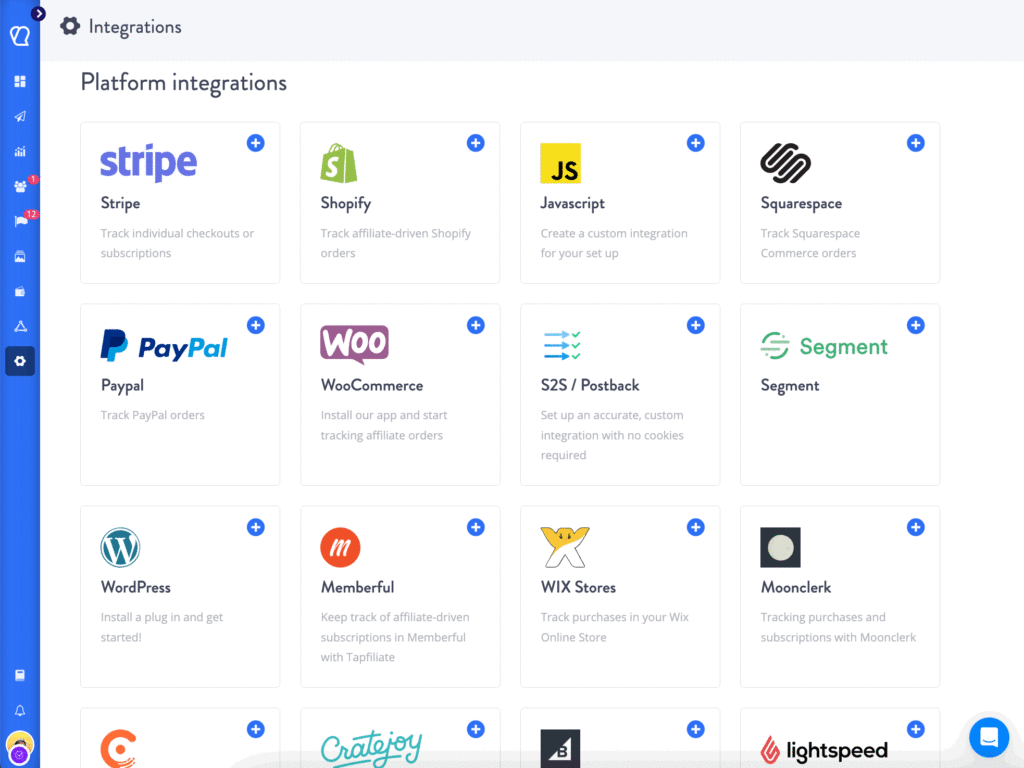
Tapfiliate connects natively to Shopify, WooCommerce, Stripe, and PayPal. It also connects to Zapier, which links to over 9,000 additional tools. For anything else, the REST API and JavaScript snippet cover custom setups.
For Shopify: install the Tapfiliate app from the Shopify App Store and link your store. Conversions start tracking immediately after installation.
For Stripe: connect your Stripe account through Tapfiliate’s settings panel. Transactions sync automatically and commissions calculate on completed payments.
For WooCommerce or custom stores: use the JavaScript snippet or the REST API. Tapfiliate’s tracking and attribution tools support cookie-based tracking, server-to-server postbacks, and coupon code tracking simultaneously.
This is where GRIN’s Shopify-only limitation becomes immediately visible. If your affiliate program runs across multiple storefronts or payment processors, Tapfiliate tracks all of them from a single dashboard.
Run a test conversion before you move to step 3. Make a real transaction through your connected store and confirm it appears in Tapfiliate. This takes about 10 minutes. It also catches integration issues before your affiliates are live.
Step 3: Import Your Affiliates into Tapfiliate

Tapfiliate accepts affiliate imports via CSV. Partner recruitment tools handle the import from your dashboard’s Affiliates section.
Your import file needs three columns at a minimum: first name, last name, and email address. You can also include custom fields such as a referral code or an affiliate group. Full instructions are in the Tapfiliate Help Center.
Format your GRIN affiliate export to match this structure. Upload through the Affiliates section. The system creates accounts and sends each affiliate a welcome email with their login credentials and new tracking link automatically.
Two things to check before you upload:
Duplicates. If any email address appears twice in your GRIN export, Tapfiliate will flag it. Clean the list before importing.
Inactive affiliates. This is a good moment to remove anyone who has not generated a click or conversion in 90 or more days. A trimmed list is easier to manage from day one and gives you a cleaner baseline on your new platform.
After the import, each affiliate gets a unique Tapfiliate tracking link. Their GRIN links will stop working when you shut down that account. This is why step 5 matters as much as steps 1 through 4 combined.
Step 4: Rebuild Your Commission Structure

Tapfiliate’s flexible commission tools support fixed amounts, percentage-based rates, recurring commissions for subscription revenue, and lifetime commissions.
Start by recreating your current GRIN rates exactly. Same percentages, same structure, same payout timing. This keeps affiliates on familiar terms and removes friction during the transition.
Once the migration is stable, look at what GRIN did not let you do:
- Tiered rates that move affiliates to higher commissions when they hit revenue thresholds
- Custom rates for specific affiliates without changing your base program rate
- Recurring commissions that pay out on every subscription renewal, not just the first conversion
- Performance bonuses that trigger automatically when affiliates hit targets
One rule: do not redesign your commission structure during the migration. Get the basic rates live first. Restructure in week 3 or 4 once tracking is confirmed and affiliates are active on the new platform.
Automated payouts connect through Trolley directly from Tapfiliate’s payout settings. Affiliates get paid on schedule without manual processing.
GRIN handles creator payments, but the system is designed for one-off campaign payouts, not recurring affiliate commissions. If you have been managing monthly affiliate payouts manually in GRIN, switching to Tapfiliate’s automated payout system is one of the more immediate operational improvements you will notice after migration.
Step 5: Tell Your Affiliates Before You Switch
This is the step where most GRIN migrations break down.
Most teams focus on the technical setup, get it working, and then send affiliates a quick email the week of the switch. Some send it the day before. A few forget entirely.
Affiliates dislike platform surprises. A sudden change to their dashboard, tracking links, and login credentials reads as disorganized. Some go inactive. A few quietly stop promoting.
Send a migration email at least two weeks before your cutover date. Keep it brief. Cover three points:
- Why you switched (direct: better tracking across your platforms, no contract, lower cost)
- What changes for them (new dashboard URL, new tracking links, new login credentials)
- What stays the same (their commission rates, payout schedule, payment method)
Give a hard date. Something like: “Your GRIN tracking links will stop working on [date]. Your new Tapfiliate link will arrive in a separate welcome email before then.”
Follow up 48 hours before the cutover. This single extra email reduces support questions significantly. Your top 10% of affiliates, the ones generating most of your revenue, deserve a personal message alongside the broadcast.
If your GRIN contract is ending and you are timing the migration around a renewal date, build the affiliate communication into that timeline. Affiliates need notice. Cancellation windows do not always allow for it automatically.
One more thing worth doing: send your top five affiliates a direct message before the broadcast email goes out. Tell them what is changing and why. Ask if they have any questions. Affiliates who feel like partners through a platform change stay active. Affiliates who feel like they are being notified of something that already happened often do not.
Your First 30 Days on Tapfiliate

Week 1 is verification. Pull the real-time reporting dashboard and confirm that click and conversion data matches your store’s order records. If numbers diverge, check the integration configuration first.
Week 2 and 3 are about activation. Tapfiliate’s automation and workflows trigger emails when an affiliate signs up, makes their first sale, or goes 30 days without a click. Set these up in week 1 so they are running before affiliates start receiving their welcome emails.
What I’ve noticed with GRIN migrations specifically: teams that come from GRIN often underestimate how much affiliate activity was invisible to them. GRIN’s Shopify-only tracking missed every conversion from non-Shopify sources. Once Tapfiliate is connected to all your channels, the actual affiliate-driven revenue number tends to be higher than your GRIN data suggested. Expect your first 30-day report to look different from what you were used to.
Week 4: Cancel GRIN. Do not wait. If you are on a month-to-month plan, billing continues until you cancel. If you are negotiating out of an annual contract, confirm your termination date before your Tapfiliate migration starts. Do not pay for two platforms longer than you need to.
FAQs about Migrating from GRIN to Tapfiliate
Is Tapfiliate better than GRIN?
It depends on your primary use case. GRIN is built for creator and influencer marketing: discovery, campaign management, UGC, and gifting at scale. If that is your main workflow, GRIN does it well. Tapfiliate is built for affiliate program management: click tracking, commission automation, partner portals, and payout processing.
Most brands that migrate from GRIN to Tapfiliate were using GRIN’s affiliate feature as a secondary tool and found it too limited, too expensive, or too tied to Shopify for their actual needs. Tapfiliate handles affiliate programs specifically, which means faster setup, more integration options, and significantly lower cost for teams that do not need the creator management layer.
How much does GRIN cost compared to Tapfiliate?
GRIN’s public pricing starts at $399/month for the Lite plan. The Complete plan runs $1,799/month. Tapfiliate’s Launch plan starts at $89/month. Scale is $179/month.
At the entry level, GRIN costs $4,788 per year. Tapfiliate Launch costs $890 per year. That is a $3,720 annual difference. On Scale, Tapfiliate costs $2,148 per year versus $4,788 for GRIN Lite. The gap widens at higher tiers. GRIN’s annual contract requirement means you commit to that gap upfront. Tapfiliate has no contract: cancel anytime.
Can I import affiliates from GRIN to Tapfiliate?
Yes. Tapfiliate accepts affiliate imports via CSV. Export your affiliate list from GRIN with names and email addresses, format it to match Tapfiliate’s import template, and upload it through the Affiliates section of your dashboard.
Each imported affiliate receives an automatic welcome email with their new login credentials and a unique Tapfiliate tracking link. Their GRIN tracking links stop working when you shut down that account. Plan your affiliate communication around this cutover date, and give affiliates at least two weeks of advance notice before the switch.
Does Tapfiliate work with platforms other than Shopify?
Yes. This is one of the primary reasons brands migrate from GRIN to Tapfiliate. GRIN’s affiliate tracking is currently Shopify-only. Tapfiliate connects natively to Shopify, WooCommerce, Stripe, and PayPal. It also works with Zapier for 9,000+ additional app connections, and supports custom integrations via JavaScript snippet and REST API.
If your store runs on WooCommerce, your subscriptions process through Stripe, or you use a custom checkout, Tapfiliate tracks all of those affiliate-driven conversions. GRIN does not. For multi-platform programs, this is not a minor difference: it is the difference between tracking your affiliate revenue accurately and missing a significant share of it entirely.
What data can I export from GRIN before switching?
Export five categories before you downgrade or cancel: your full affiliate list (names, emails, commission rates), commission and payment history, creative assets (briefs, images, banners), active tracking links and UTM parameters, and historical click and conversion data.
Do this before you make any changes to your GRIN account. Access levels and data availability change after cancellation, and in some cases data becomes unavailable entirely. Set aside at least one full business day to download, verify, and back up every file. Confirm each export opens correctly before you start the Tapfiliate setup.
Migration from GRIN to Tapfiliate: Final Take
The migration takes less than a week for most programs. The financial case for doing it is straightforward: at the entry level, you save $3,720 per year with no contract. At Scale, you save $2,640 per year. And you get affiliate tracking that works across Shopify, Stripe, WooCommerce, and 30+ other platforms.
The technical steps are not the hard part. Set up Tapfiliate, connect your store, import your affiliates, and rebuild your commissions. The part most teams underestimate is the affiliate communication. Two weeks of advance notice, a clear cutover date, and a personal note to your top affiliates makes the difference between a clean migration and a drop in affiliate activity.
Start your free trial at Tapfiliate. Your tracking is live within minutes of connecting your first integration. And within the first week, you will know exactly what your affiliate program is worth when it is actually measured correctly.

Jessica Rangel
Spending my days writing marketing content, cycling around canals in Amsterdam, and attempting to master the Dutch language.
Similar articles











In this article
Why Brands Are Leaving GRIN in 2026
GRIN vs. Tapfiliate: What the Numbers Actually Show
Before You Migrate: What to Export from GRIN
Step 1: Set Up Your Tapfiliate Account
Step 2: Connect Beyond Shopify
Step 3: Import Your Affiliates into Tapfiliate
Step 4: Rebuild Your Commission Structure
Step 5: Tell Your Affiliates Before You Switch
Your First 30 Days on Tapfiliate
FAQs about Migrating from GRIN to Tapfiliate
Migration from GRIN to Tapfiliate: Final Take
Get content like this, and more, sent directly to your inbox
Thank you!
We will contact you soon.
